Overview
This article walks you through all the settings available in the CloudFiles Salesforce Settings page. This page consistes of several account level settings as well as the API Keys.
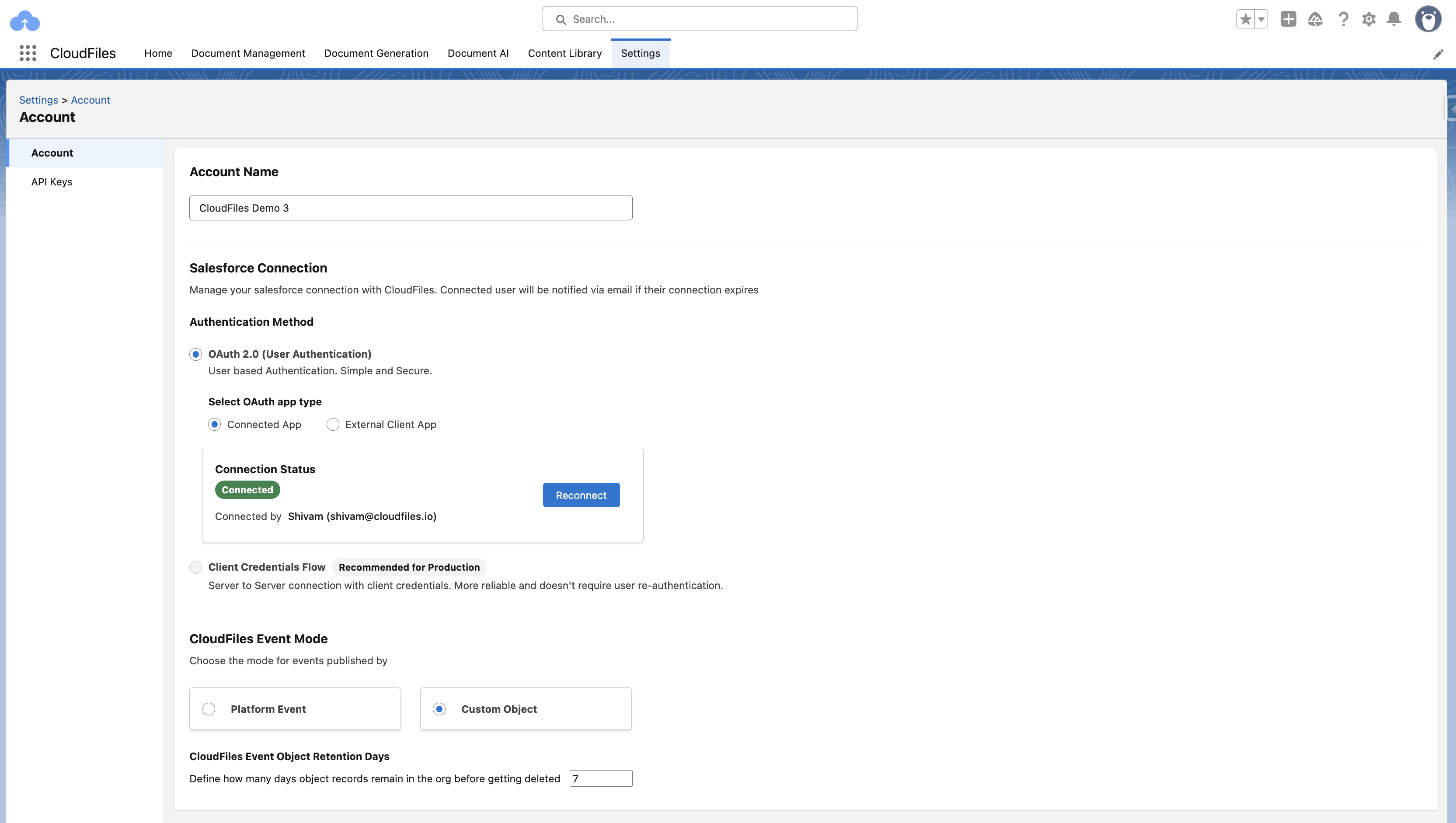
Account Settings
The Account settings page contains all configuration options related to your Salesforce connection. These settings determine how CloudFiles authenticates, how events are delivered to Salesforce, and how long event history is retained.
Authentication Methods
CloudFiles offers two authentication options for connecting with Salesforce:
- OAuth 2.0 (User Authentication)
- Client Credentials Flow (Server-to-Server Authentication)
1. OAuth 2.0 (User Authentication)
OAuth 2.0 is the most common and easiest method to connect CloudFiles to your Salesforce org. You simply log in using your Salesforce username and password and grant permission for CloudFiles to access the org. Once connected, CloudFiles uses that user’s access to perform actions like creating records or reading data.
This method works using Salesforce’s built-in app framework—Connected Apps or External Client Apps, depending on your Salesforce edition.
Connected App vs External Client App (What’s the difference?)
Salesforce historically used Connected Apps to manage OAuth access for external services. When you installed CloudFiles, a managed Connected App was included in the package so CloudFiles could authenticate through it.
Salesforce later introduced External Client Apps as the modern version of Connected Apps for managed packages. Functionally, they do the same thing—they allow external applications like CloudFiles to connect and request access tokens—but External Client Apps offer:
- Better long-term security management
- Clearer controls for integration policies
- A simplified interface for enabling flows like Client Credentials
2. Client Credentials Flow (Recommended for Production)
The Client Credentials Flow creates a server-to-server connection between CloudFiles and Salesforce. Instead of relying on a human to log in, CloudFiles uses a Salesforce-issued client ID and client secret to authenticate automatically.
In Salesforce Setup, an admin enables Client Credentials inside the CloudFiles External Client App and selects a Run As integration user. CloudFiles then performs all Salesforce operations under that integration user’s permissions. No user login or refresh token is required.
This creates a stable, hands-off, long-term connection.
When to Use OAuth vs Client Credentials
Now that both methods are defined, here’s how to choose the right one:
Use OAuth 2.0 when:
- You are setting up CloudFiles for the first time
- You are working in a sandbox or testing environment
- It’s acceptable for the connection to depend on a specific Salesforce user
OAuth is great for getting started quickly, but the connection can break if the user is deactivated, restes their password, or if the refresh token expires.
Use Client Credentials Flow when:
- You are configuring a production org
- You want a stable, long-term connection that never requires re-login
- You want to avoid dependencies on individual user accounts
Client Credentials Flow is the recommended approach for all production environments because it is more reliable, more secure, and easier to maintain.
Event Mode
CloudFiles sends events to Salesforce whenever important actions occur (folder creation, file uploads, etc.). You can choose how these events are delivered:
1. Custom Object Mode (Preferred)
In this mode, CloudFiles creates a CloudFiles Event record inside Salesforce for each event. This is the recommended option for most users because:
- It works directly with Record-Triggered Flows
- Events are easy to inspect and debug
- Event history is fully visible inside Salesforce
This mode is simple and reliable, which is why it’s the default.
2. Platform Event Mode
Platform Events are real-time event messages published to Salesforce’s event bus. They are useful for advanced architectures or high-volume streaming scenarios.
However:
- They are harder to debug
- Missed events cannot be inspected later
- You must configure Flow or Apex subscribers
Event Retention Policy
If you're using Custom Object mode, CloudFiles stores event records in Salesforce. The Event Retention Days setting controls how long these records are kept before CloudFiles automatically deletes them. The Default value is 7 days however you can increase the number to retain longer history or decrease it to save Salesforce storage .
API Keys
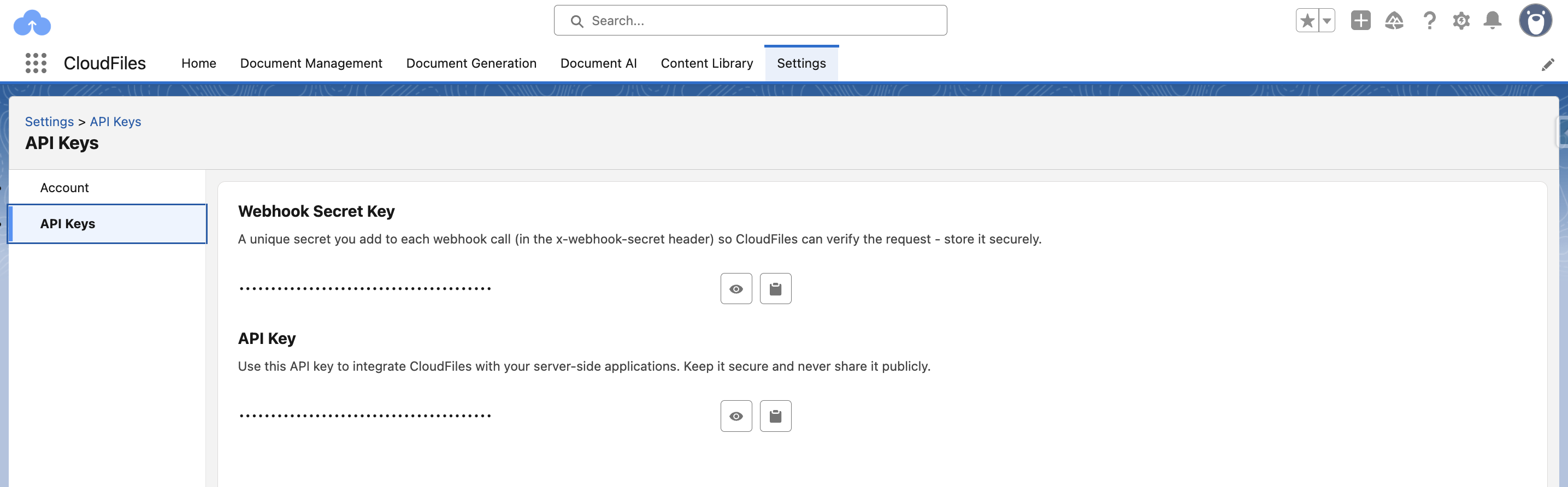
The API Keys section provides two important credentials used for advanced or external integrations with CloudFiles: the Webhook Secret Key and the CloudFiles API Key.
The Webhook Secret Key is used to verify incoming webhook requests that are sent to CloudFiles from external systems such as SharePoint, OneDrive, or custom automation workflows. Whenever an external service notifies CloudFiles about a file event, it must include this secret key in the request header so CloudFiles can confirm the request is legitimate. This ensures that only trusted systems can trigger CloudFiles events.
The CloudFiles API Key, on the other hand, is used when making authenticated requests to the CloudFiles REST API from custom servers or backend applications. Developers rely on this key when building programmatic file uploads, generating CloudFiles links through external services, or integrating CloudFiles with other platforms outside Salesforce.