Datasets are useful when working with related documents such as contracts, quotes, insurance forms, or reports where information may need to be extracted, compared, or summarized across multiple files.
After the dataset has been processed, you can test and query it using the AI Playground by navigating to the AI Playground tab, clicking on Create Playground, and selecting Dataset Playground from the dropdown. During setup, choose the dataset you want to query, and once the playground session is created, all documents within that dataset are loaded and available for querying.
Dataset Playground View
The Dataset Playground interface is designed to help users experiment with prompts and observe how the AI interprets information across an entire dataset. It provides a structured environment where users can review documents, test queries, and validate results before implementing them in automation workflows.
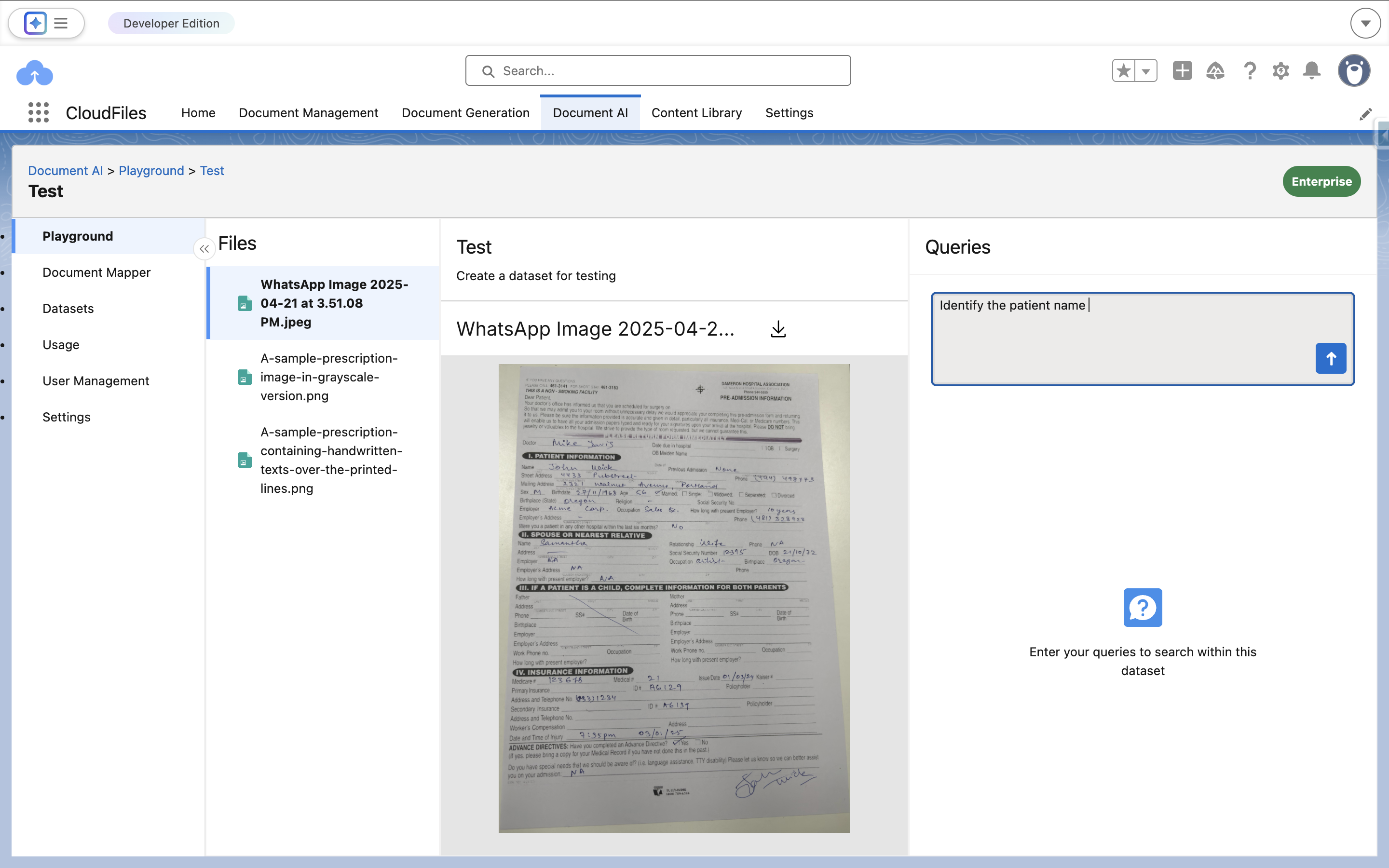
The interface includes the following components:
Files Panel
The Files Panel displays all documents that belong to the selected dataset. These files are the same documents that were uploaded and processed during dataset configuration.
Users can:
- View the complete list of documents included in the dataset
- Select any document to preview its contents
- Switch between documents to better understand the context of the dataset
Although queries run across all documents in the dataset, selecting a specific file allows users to inspect the document content and verify how the AI extracts information from it. This is particularly helpful when refining prompts or troubleshooting unexpected query results.
Document Viewer
The Document Viewer allows users to preview, zoom in, scroll, and download the uploaded document for easy reference.
Query Panel
The Query Panel allows users to enter natural language prompts to test queries against the selected dataset. Unlike the File Playground where prompts run on a single document, the Dataset Playground analyzes all documents contained within the dataset and returns results based on the combined information across those files.
Using Natural Language Processing (NLP), the system can interpret prompts and extract relevant information from both printed and handwritten text, including text present in images.
Users can run different types of prompts such as classification, extraction, validation, summarization, decision-making, or calculation queries to analyze the dataset.
The results are returned as text-based outputs derived from the dataset content. If the system determines the answer with high confidence, it returns the extracted result. If the query is unclear, unrelated to the dataset, or the confidence level is low, the system returns NA to ensure accuracy.
Query History
The Query History section stores and displays previously asked queries along with their extracted answers for quick reference.
Why Use the Dataset Playground
The Dataset Playground is primarily used to test and refine prompts before using them in automation. It allows users to verify how queries behave across multiple documents and ensure that the extracted information is accurate.
Here’s your example rewritten in the same format for KYC documents:
Upload multiple documents to the Dataset and use the Dataset Playground to run queries across all files in that dataset.
For example, you upload a dataset containing multiple KYC documents (such as passports, driver’s licenses, or ID cards) for identity verification.
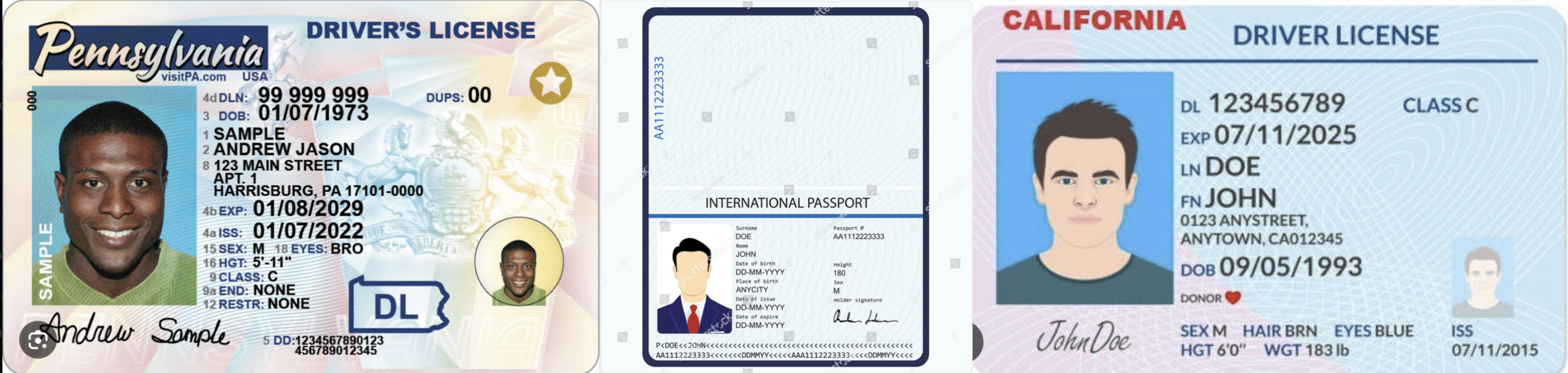
These documents may belong to the same individual or different individuals, and may include variations in name formats, missing fields, or inconsistent details.
Ask queries that analyze information across all documents in the dataset, such as verifying whether all documents belong to the same person based on key identity fields like name and date of birth.
For example:
Query: Instruction: Verify identity consistency across KYC documents.
Task: Review all documents in the dataset and extract the full name and date of birth of the primary individual from each document. Normalize name formats (e.g., "DOE, JOHN" → "John Doe") and compare across all documents. Determine whether all documents belong to the same person. If not, group documents by matching identities.
Output:
{
  "result": "Different Individuals",
  "groups": [
    {
      "name": "John Doe",
      "documents": ["Passport", "Driver License"]
    },
    {
      "name": "Andrew Sample",
      "documents": ["Driver License"]
    }
  ]
}
Once a query works as expected in the playground, the same prompt can be used in Salesforce automation using CloudFiles Document AI Flow actions such as Query Document/Dataset and Query Document/Dataset (Batch). This enables automated workflows that analyze and extract information from entire document collections.