The associated resource remains connected to the HubSpot record, ensuring that users can view, open, or perform file operations within HubSpot while the original file continues to reside in its external storage platform. This article talks about the following sections:
- Sidebar Widget vs App Card Associations: Explains how associations differ in layout and features between the two interfaces.
- File, Folder, and Dataroom Association: Describes the types of resources that can be linked to HubSpot records.
- Single and Multiple Associations: Outlines how users can associate one or several files or folders based on need.
- Cross-Library Associations: Covers linking content from multiple storage platforms to a single HubSpot record.
Sidebar Widget vs App Card Association
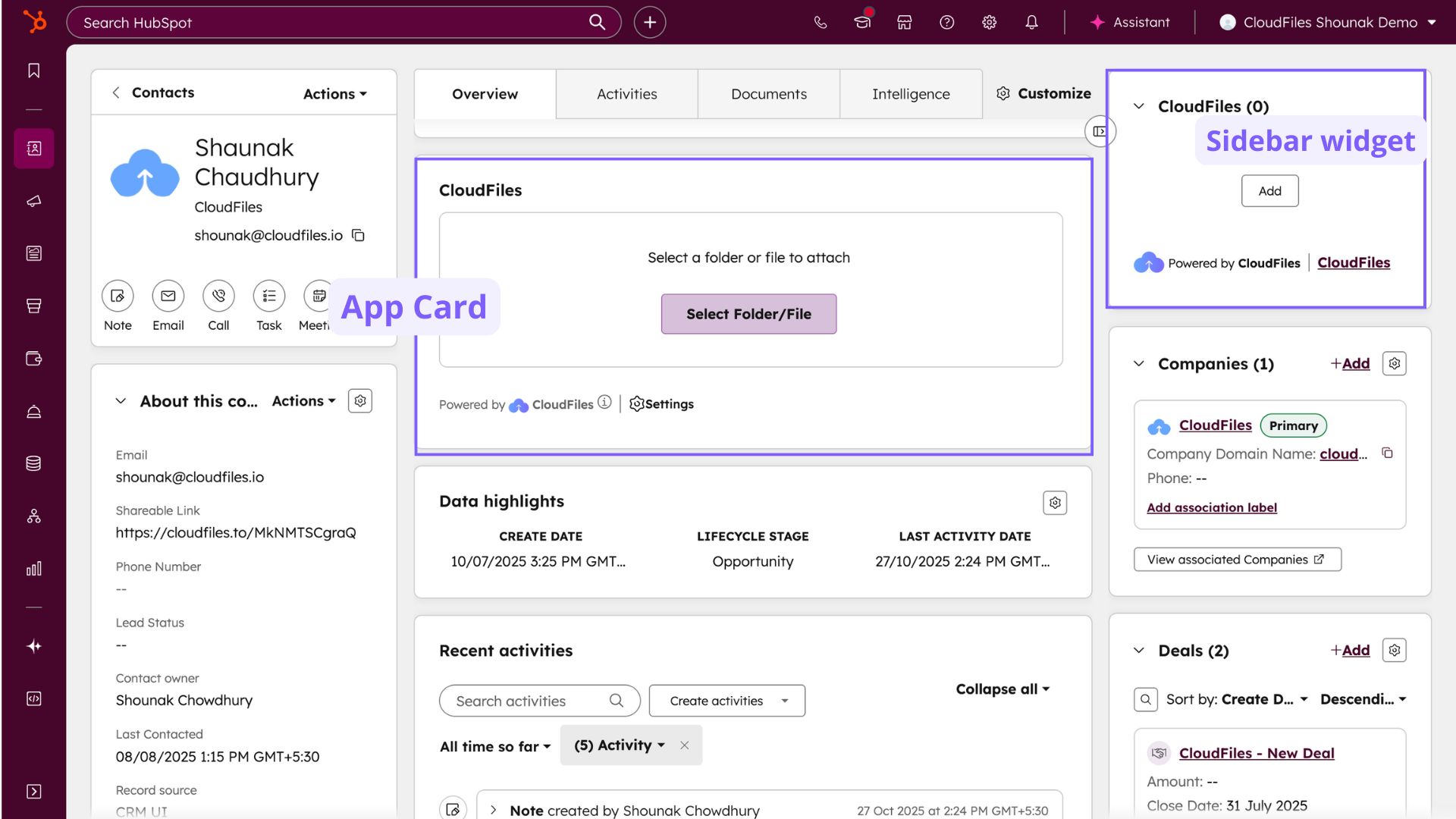
CloudFiles supports creating associations through two different interfaces, the Sidebar Widget and the App Card. Both connect external files or folders to HubSpot records, but they differ in layout and functionality.
| Aspect | Sidebar Widget | App Card |
|---|---|---|
| Location in HubSpot | Appears on the right-hand sidebar of contact, company, deal, and ticket records. | Appears in the central section of a record under an existing or newly created tab. |
| Display Format | Shows each associated item as a resource tile with metadata and basic actions. | Displays files and folders in a content view similar to a storage interface. |
| Access Method | Uses the Add button to open the Content Library for association. | Uses the Select File/Folder button to open the Content Library for linking. |
| Primary Use | Suitable for quick associations or linking a few individual files or folders. | Suitable for detailed file and folder management, navigation, and viewing multiple items. |
| Navigation | Displays only the selected file, folder, or dataroom. | Allows browsing through subfolders with breadcrumb navigation. |
Both interfaces create the same type of file or folder association. The choice between them depends on where the user prefers to view and manage linked content within the HubSpot record.
File, Folder, and Dataroom Association
CloudFiles supports three types of associations depending on the type of resource:
- A file association connects an individual document, such as a PDF, spreadsheet, or presentation, to a HubSpot record. The linked file can be opened, previewed, shared, or updated directly within HubSpot.
- A folder association connects an entire directory from an external storage platform. This allows users to access multiple files and subfolders through the App Card or Sidebar Widget, depending on configuration.
- A dataroom association links a preconfigured/configured CloudFiles dataroom to a HubSpot record. Datarooms may contain a collection of files, folders, or request blocks organized for sharing or tracking.
Each type of association provides direct access to its contents within HubSpot and maintains a live connection to the external storage source.
Single and Multiple Associations
CloudFiles allows both single and multiple associations depending on the record's requirements.
In some cases, users may only need to link a single file or folder to a HubSpot record. For example, attaching a single contract document to a deal. This type of association is simple and best suited for records that reference one key document.
In other cases, users can create multiple associations to link several files, folders, or datarooms to the same record. For instance, a company record might contain multiple proposals, reports, or shared folders from different team members or departments. Multiple associations provide flexibility and make it possible to maintain several linked items under the same HubSpot record.
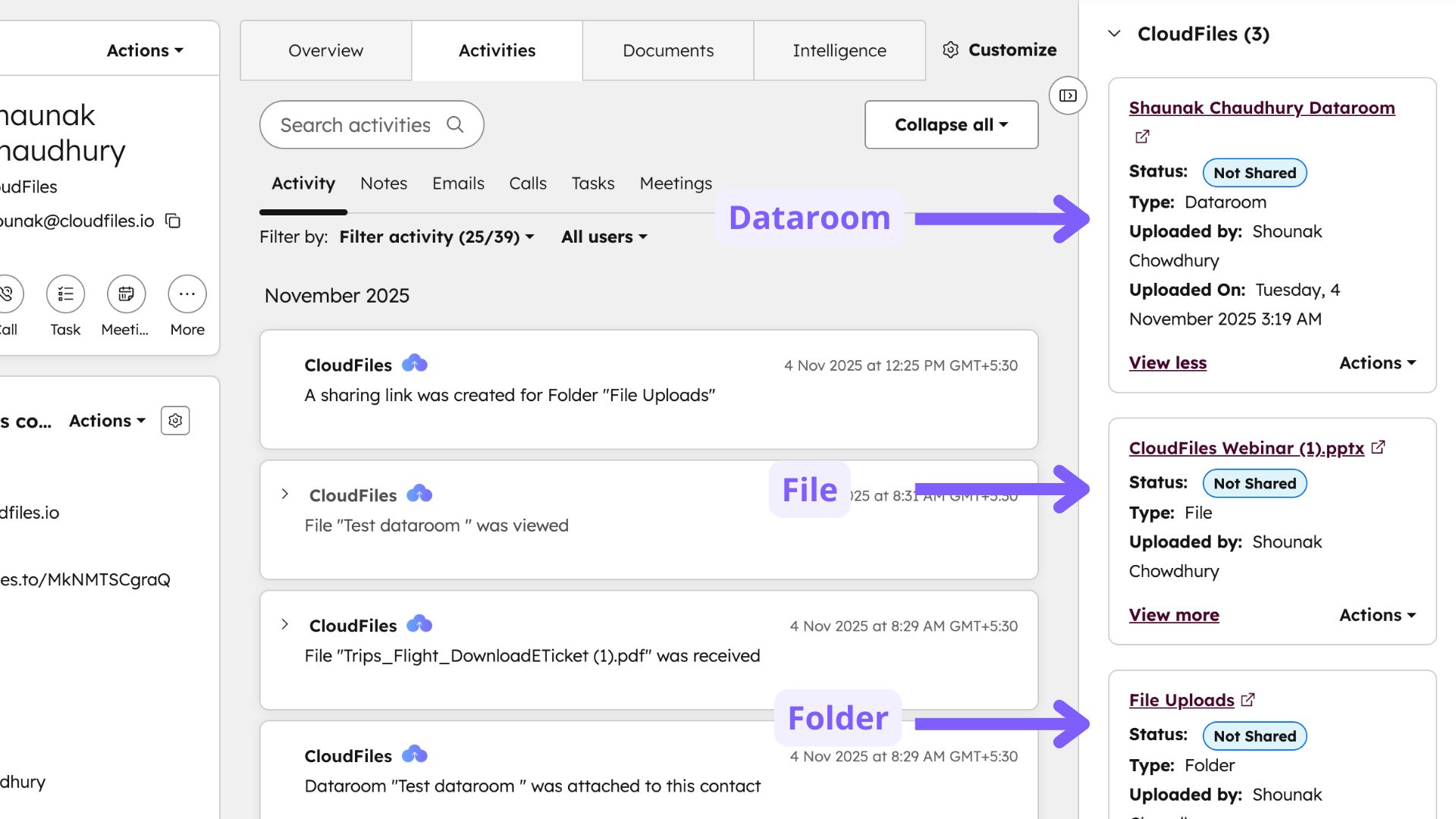
CloudFiles supports both scenarios, and users can choose the appropriate method based on their data management needs.
Cross-Library Associations
CloudFiles supports cross-library associations, allowing files and folders from different connected storage platforms to be linked to the same HubSpot record.
Through the Content Library, users can access all integrated storage platforms such as Google Drive, SharePoint, OneDrive, Box, Dropbox, or AWS S3 and select files or folders from any of them. For example, a user can associate one file from Google Drive and another from SharePoint to the same HubSpot record.
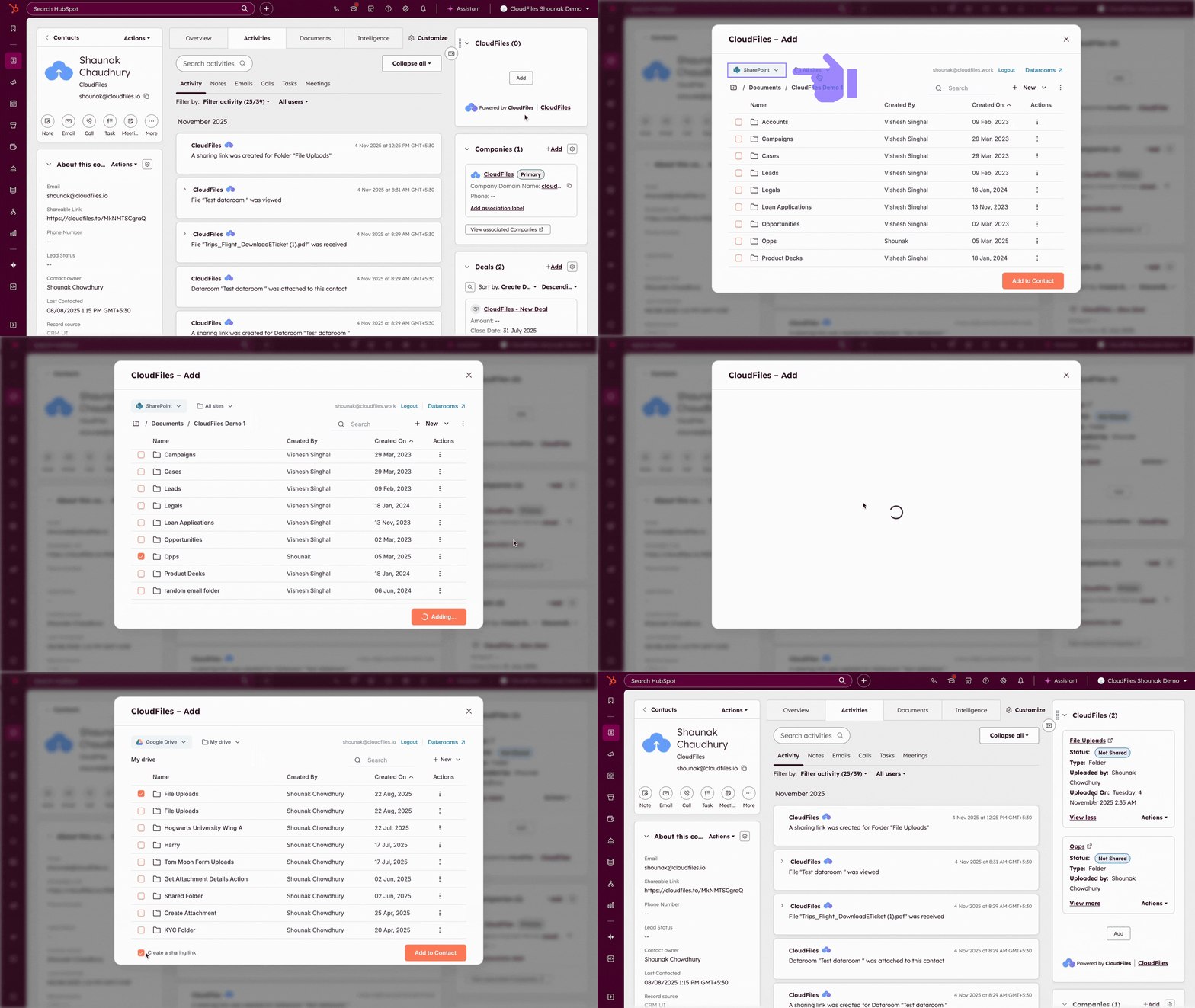
This flexibility ensures that records can contain relevant materials from multiple storage systems without requiring manual consolidation. Cross-library associations work in both the Sidebar Widget and the App Card.
Thus, associations in CloudFiles establish a direct link between external files or folders and HubSpot records.