Issue Overview:
If you see the following error while using CloudFiles actions inside HubSpot Workflows:
{"message":"You don't have access to CloudFiles actions in Workflows on your current plan.","error":"Forbidden","statusCode":403}
this article explains why it happens and how to resolve it.
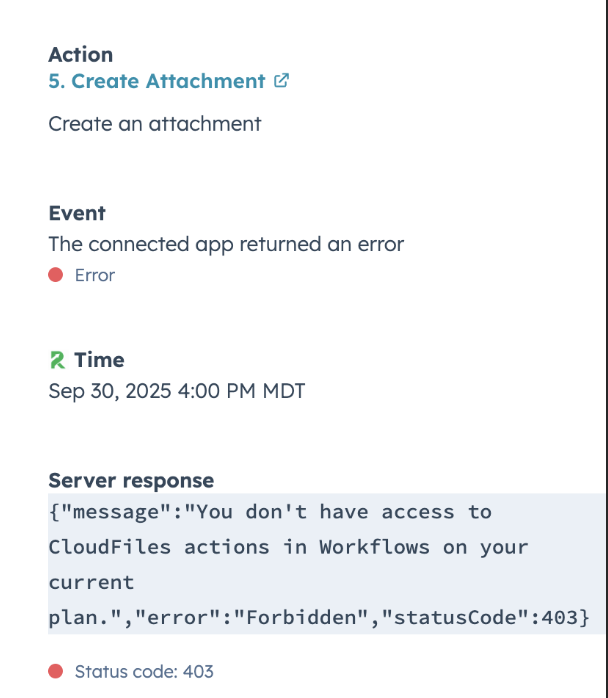
Why this error occurs?
CloudFiles Workflow actions (such as creating folders/attachments, copy/move/update resocures, etc. through Workflows) require a paid CloudFiles plan that includes automation features.
If your account:
- is on a Free plan, or
- is on a plan that does not include Workflow automation,
This can happen even if the actions worked previously, because your plan may not include the required permissions.
This error appears only when using CloudFiles Workflow actions inside HubSpot. These include actions that upload files to CloudFiles or SharePoint, delete files, create CloudFiles links, or attach CloudFiles files to HubSpot records. Since these actions rely on automation access, they require a CloudFiles plan that supports workflow automation. If the account is on a plan without automation support, HubSpot will block these actions and show the 403 error.
How to fix the issue?
1. Check Your Current CloudFiles Plan
You can verify your subscription from:
CloudFiles for Hubspot App → Settings → Subscriptions.
If the plan shows Free or Trail or does not mention the plan that supports automations, that's the reason for the error.
2. Upgrade to a Supported Plan
To enable Workflow actions, upgrade your subscription from:
CloudFiles App → Settings → Billing → Manage Billing in Stripe
or contact CloudFiles Support to confirm the right plan for your needs.
3. Retry the Workflow Step
After upgrading:
- Refresh HubSpot
- Open your Workflow again
- Trigger the action
The error should be resolved.