Introduction
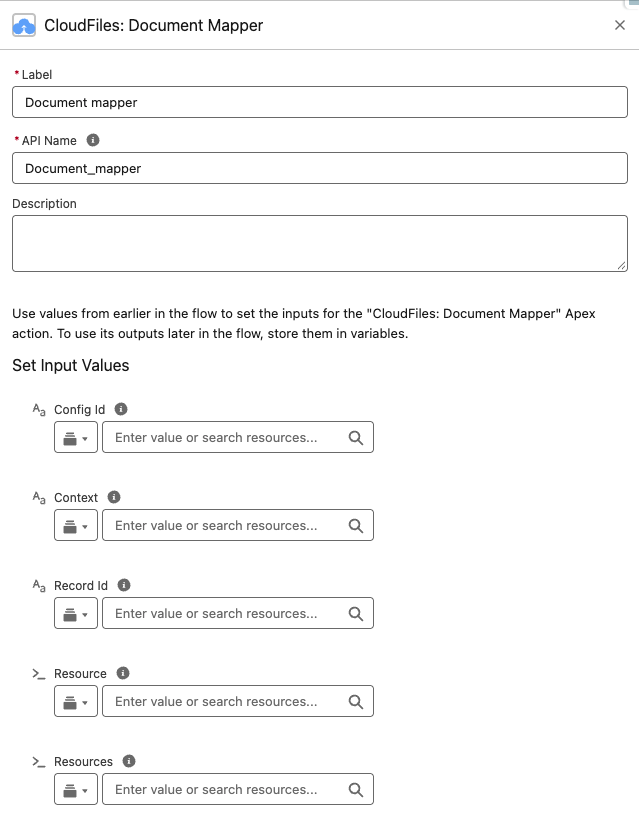
The CloudFiles Document Mapper flow action enables execution of a Document Mapper configuration directly from a Salesforce flow. This action processes a document, extracts structured data using the configured mapping, and then creates or updates Salesforce records automatically. It's particularly useful for converting documents such as invoices, forms, or contracts into Salesforce records as part of an automated process without requiring user interaction.
What This Action Does
The Document Mapper action runs a pre-created Document Mapper configuration against a provided file. When executed, CloudFiles processes the document using the configuration specified by the Config ID. Based on that configuration, Salesforce records are created or updated automatically.
If a Record ID is not provided, the action creates new Salesforce records exactly as defined in the document mapper configuration, including a primary record and any related or child records such as line items.
If a Record ID is provided, the action updates the specified Salesforce record and creates any related records defined in the configuration, enriching existing records with data extracted from documents while supporting complex parent-child record creation.
The action runs asynchronously and publishes events once processing is complete.
Input Parameters
Config ID
This parameter specifies the Document Mapper configuration to use when processing the document. The configuration controls which Salesforce objects are created or updated, which fields are populated, and how parent-child relationships are handled. It also defines the prompts used by Document AI to extract data from the document.
You can obtain the Config ID from the CloudFiles app > Document AI > Document Mapper tab. This value is required for the action to run.
Resource
The Resource parameter represents the file to be processed by Document Mapper. This input must be provided as an Apex-defined variable representing a CloudFiles Resource. The document referenced by this resource is the file from which data will be extracted and mapped to Salesforce records.
To Process a Salesforce File
To specify a Salesforce File to be processed, input parameters as follows (please note the parameters are case sensitive):
- Library - salesforce (please note the parameters are case sensitive)
- FileID - The ContentDocumentID of the Salesforce File to be processed.
You can get the ContentDocumentID of the Salesforce File from other standard salesforce elements like "Get Records" or standard Screen Flow "Upload Files" component or from details of CloudFiles Events like Salesforce File Attached.
- You can only process a Salesforce File in ContentDocument format.
- You cannot process an Attachment i.e. Classic Salesforce File format.
- It is mandatory to input both Library and FileID to specify a Salesforce File.
To Process an External Storage File
If you are using the CloudFiles: Document Management package as well, then you can process a file in connected external storage. In order to specify an External Storage File to be processed, input parameters as:
- Library - The Library parameter is the external storage type you are using. Possible values are sharepoint, google (for Google Drive), onedrive, dropbox, box, azure, cloudfiles (for AWS S3). Please note the parameters are case sensitive.
- Drive Id - The Id of the drive where the document resides. This is important for Google Drive & SharePoint libraries only. The Drive Id is a unique identifier for a storage location in both SharePoint and Google Drive. In SharePoint, it represents a document library within a site, while in Google Drive, it identifies a user's drive or shared drive.
- fileid - The unique identifier (Resource Id) of the file that is to be processed.
Based on the use case, you can get these parameters from details of other CloudFiles Events like File Uploaded or File Received etc.
Resources (Optional)
Use Resources instead of Resource to process a document set: several related files read together in one run to create or update one record. Pass a collection of Resource variables, one per file, each set up the same way as the Resource input. Set either Resource or Resources, not both. Setting both stops the Flow with an error.
- In Flow Builder, select New Resource.
- Set Resource Type to Variable, enter an API Name (for example,
varDocumentSet), set Data Type to Apex-Defined, select Allow multiple values (collection), set Apex Class tocldfs__Resource, then select Done.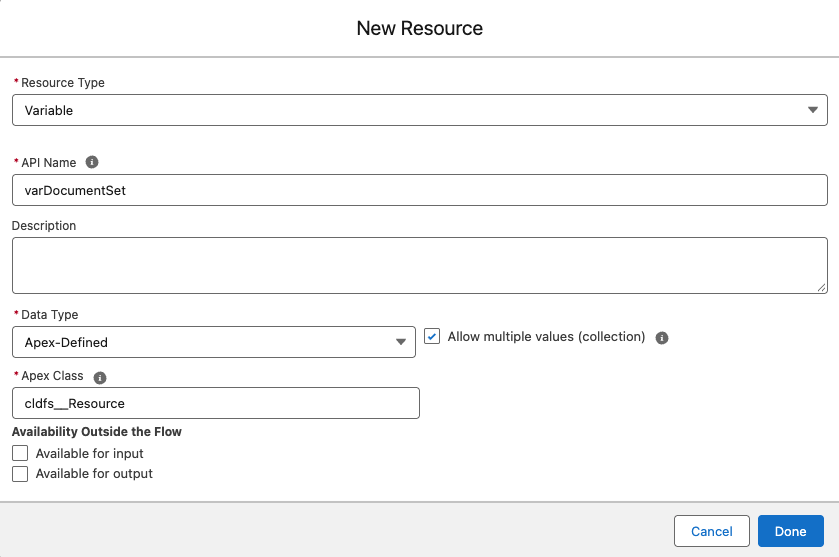
- For each file, create a single Resource variable (for example,
varFile1andvarFile2) and set its Library and file Id, plus Drive Id for external storage, as described above. - Add an Assignment element. For each file, add a row with
varDocumentSetas the Variable, Add as the Operator, and the file’s Resource variable as the Value.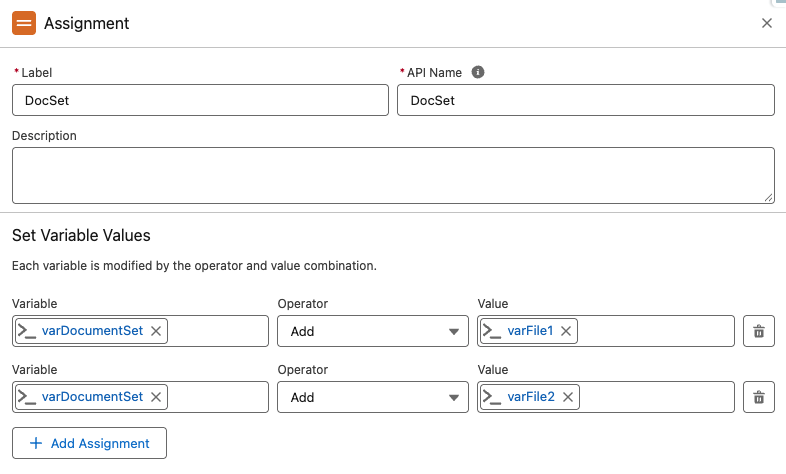
- In the CloudFiles: Document Mapper action, pass
varDocumentSetas the Resources input and leave Resource empty.
Record ID (Optional)
The Record ID parameter allows you to specify an existing Salesforce record to update. When this value is provided, the Document Mapper run action updates the specified record using the extracted data. Any related or child records defined in the configuration are also created as part of the same execution. If this parameter is not provided, the action creates new Salesforce records based on the configuration.
Context (Optional)
The Context parameter is a text value that is passed through to the Document Mapper Run event. It is helpful when this action is used in several flows. For example, if you’re processing documents attached to Contact records, you can set the Contact’s Record Id as the Context, and the event will carry it so each run can be traced back to its Contact.
Output Parameters
The apex action does not return anything as an output in the flow it is used but for every run (one per file, or one per document set), a Document Mapper Run event is published. This event includes information about the processed document and the records involved in the execution and can be used to trigger platform event flows to perform any post-processing actions. For a document set, the event’s FileId is the first document in the set.
If the action fails due to some reason, an error-event event will be triggered and this event can be used in a decision element to diagnose and handle the error.