Use packets when documents should be checked before a signer receives them, or when you want one Salesforce record that tracks a signing request from generation to completion. A mistake found at review means voiding a packet that was never sent, instead of voiding and resending a DocuSign envelope.
Before You Begin
- DocuSign is connected under Document Generation → Integrations. See Sending Documents for Signature.
- Your templates have at least one Signer recipient with a signature field.
- A Flow generates the documents with the Generate Document, Generate Document (Sync) or Generate Document (Batch) action, or Apex calls the same actions. Generating a document from the Doc Gen widget does not create a packet.
- The people who review packets have the CloudFiles Admin User or CloudFiles Standard User permission set.
How a Packet Is Created
A packet is created when a Generate Document action runs with its Packet Settings (optional) input filled in. Each action's page shows how to set it up. Packet Settings has two settings:
| Setting | What it does |
|---|---|
| Create a document packet | Creates a CloudFiles Document Packet record for the generated documents. Leave it empty or off and the action behaves as before: no packet record and no review step. |
| Require approval before sending | On by default, including when left empty. The packet waits at Requires Approval until someone approves it, and nothing is created on DocuSign before then. Turn it off to keep the packet for tracking only: the envelope is sent as soon as every document is generated. |
Each generated document gets its own packet. With Generate Document (Batch), turning on Send all documents in a single envelope in Signing Settings puts every document from that input into a single packet and one envelope, so the reviewer approves them together.
Review and Approve a Packet
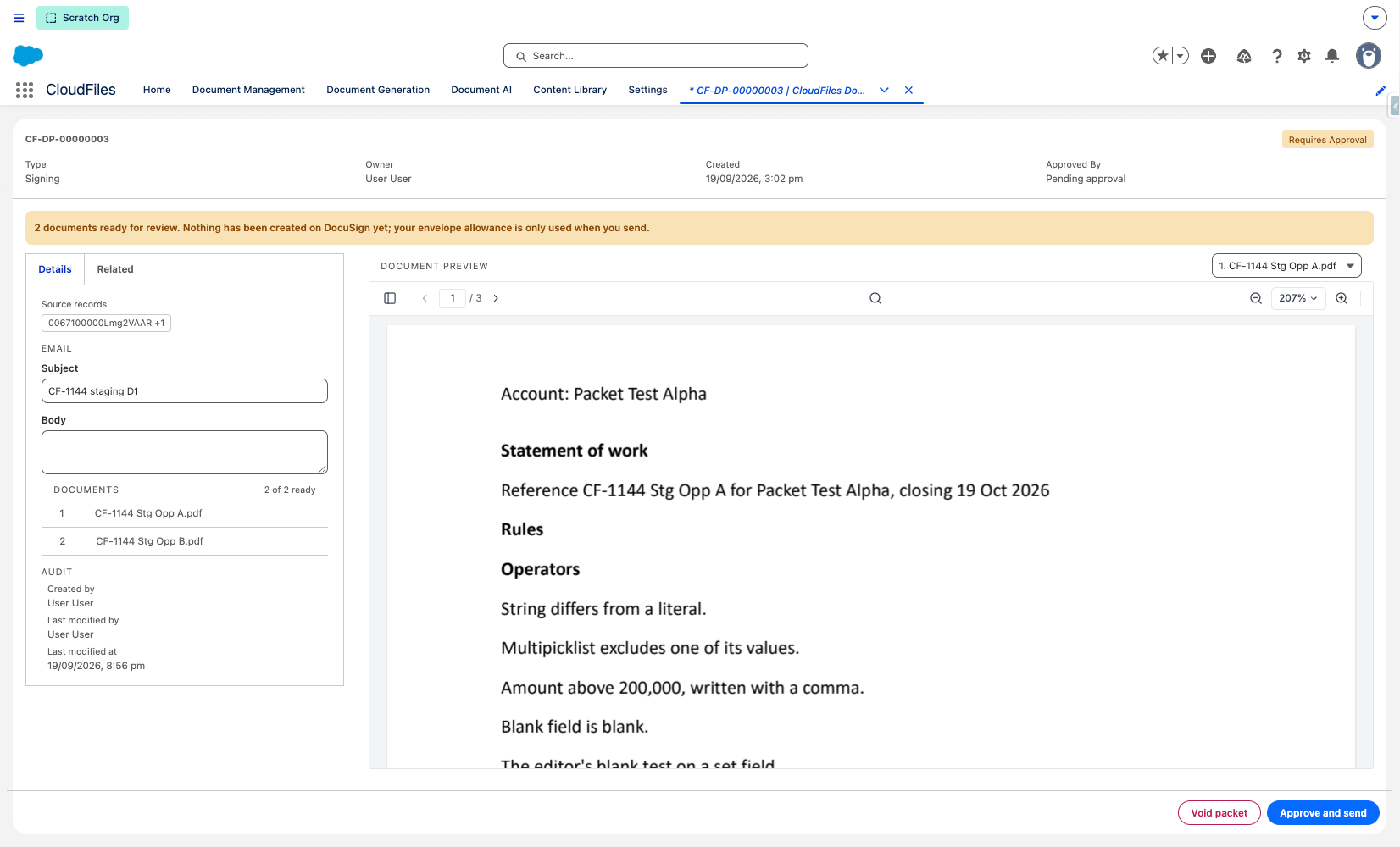
Packets are listed on the CloudFiles Document Packets tab. A packet's record page shows every document in a built-in viewer, and the reviewer approves the packet there with Approve and send, or voids it with Void packet if a document is wrong.
After the Packet Is Sent
Once a packet is sent, its record shows each recipient's signing status, and the signing email can be resent or the envelope voided from the same page. When every signer has signed, the packet moves to Completed, the signed documents are delivered as before, and the viewer can switch between the signed copies and the originals.
Packet Statuses
| Status | Meaning |
|---|---|
| Generating | Documents are being generated. The page shows how many are ready. The packet cannot be approved yet. |
| Requires Approval | Every document is generated and the packet is waiting for someone to select Approve and send. Nothing exists on DocuSign yet. |
| Approved | The packet was approved, by a person or automatically when approval is off, and the envelope is being created. |
| Sent | The envelope is with DocuSign, waiting on signers. |
| Completed | Every signer signed and the signed documents were delivered. A packet with nothing to sign ends here as soon as its documents are generated, without waiting for approval. |
| Declined | A signer declined in DocuSign. |
| Voided | The packet or its envelope was voided. |
| Failed | Something stopped the packet, for example a document that failed to generate. The page shows the reason. |