Skip to content
Salesforce HubSpot Developers Release notes
AppExchange
Quick Starts
🚀Installation guide🚀Connect external folder to a record🚀Access, share and track a file🚀Share files in experience cloud (community)🚀Document Generation with CloudFiles
Test Drive
Document Generation Test Drive
🧪Automated Doc Gen🧪Manual Doc Gen🧪Merge Documents🧪Merge External Documents🧪Real-Time Document Generation with Runtime Variables🧪Secure PDF Generation
Document Management & Sharing Test Drives
🧪Automatic Folder Structures Test Drive🧪CloudFiles Widget Configurations Test Drive🧪Copy Email Attachments to Case Folders Test Drive🧪Custom Object Creation on File Upload Test Drive🧪External File Sharing & Collection via CloudFiles Datarooms🧪Move External Storage Files to SFDC Files Test Drive🧪Move Lead folder to Account folder on conversion🧪Move SFDC Files to External Storage Test Drive🧪Nested Folders based on Object Relationships Test Drive🧪Template Folder Cloning Test Drive🧪Update Sharepoint Folder Name Test Drive
Document AI Test Drives
🧪Business Document Fields & Line Items Extractor🧪Document AI Playground Test Drive🧪Document Mapper🧪KYC Upload Checker using AI🧪Smart SharePoint Column Updates Using Document AI🧪Split External Files using AI🧪Split Salesforce Files using AI
Events
Intercepting CloudFiles Events
◈Custom Object Mode Flow Setup
Platform Event Mode Flow Setup
◈CloudFiles Event Object
All Event Types
◈Content Version Created◈Content Version Created Batch◈Dataset Created◈Document Generated◈Document Mapper Run◈Document Processed◈Document Signed◈Document Split◈Error Event◈File Received◈File Replaced◈File Uploaded◈File Viewed◈Folder Created◈Resource Attached◈Resource Cloned◈Resource Deleted◈Resource Detached◈Resource Moved◈Resource Updated◈Salesforce File Attached◈Salesforce File Copied
Capturing SharePoint Events
◈File Uploaded in SharePoint◈Resource Updated in SharePoint
Flow Actions
Doc Management Flow Actions
⚡Copy Resources⚡Copy Salesforce Files⚡Create Attachment⚡Create File Connect Files⚡Create Folder⚡Create Folder (Async)⚡Create Microsoft Team⚡Create Salesforce File⚡Create Salesforce Files (Batch)⚡Create SharePoint Site⚡Create Sharepoint Drive⚡Delete Attachment⚡Delete Resource⚡Get Attachments⚡Get Connected Folder⚡Get Files Connect Resource Id⚡Get Folder Contents⚡Get Resource Details⚡Get Resource Property⚡Get Salesforce Files⚡Get Shared Resources⚡Move Resource⚡Search by Resource Metadata⚡Set Resource Property⚡Set Resource Property (Batch)⚡Update Permissions
Doc Sharing Flow Actions
⚡Add to Dataroom⚡Create Dataroom⚡Create File Request⚡Create Link⚡Remove from Community⚡Share With Community User⚡Update Link Settings
Doc Generation Flow Actions
⚡Get Doc-Gen Templates⚡Generate Document⚡Generate Document (Sync)⚡Generate Document (Batch)⚡Merge Documents (Sync)
Doc AI Flow Actions
⚡Create Dataset⚡Document Mapper⚡Process Document using AI⚡Query Document/Dataset⚡Query Document/Dataset (Batch)⚡Split Document using AI
Misc Flow Actions
⚡Assign User Licenses⚡Unassign User Licenses⚡Delay⚡Get Event Details
Screen Flow Elements
⚡Internal Widget⚡Experience Cloud Widget⚡CloudFiles Uploader
Tutorials
Document Management Tutorials
📘Automated nested folders creation based on object relationships📘Automatically moving files from Salesforce storage to external storage📘Copy Email Attachments to Case Folders in external storage if Email-to-Case is activated📘Create Automated Folder Hierarchies for Managing External Files from Salesforce Objects📘Delete attached folder when Account record is deleted📘Enable Custom Actions in CloudFiles Widget: Build an Archive Button with Salesforce Flow📘Move Lead folder to Account folder on conversion📘Renaming a folder in Sharepoint when the Record is updated📘Setting Up a Custom List Action in the CloudFiles Widget
Document Generation Tutorials
📘Build a template (Word)📘Generate a document manually📘Generate a document via automation📘Generate a document via Screen Flow📘Generate a document with runtime variables📘Build a PDF template📘Merge documents📘Secure PDF
Document AI Tutorials
AI Flows - Initial Setup Guide
📘Process Salesforce Files📘Process External Files
📘Batching AI Queries📘Classify and Rename Uploaded Files📘Document Mapper Tutorial📘Document Checklist📘Get CSV text Output from AI Query📘Get JSON Output from AI Query📘KYC Upload Checker📘Line Item Extraction📘Mass property extraction from a Medical Form📘Signature Checking📘Simple Data Extraction from KYC Files📘Splitting multiple combined POs into child objects
Document Generation
Installation
🧭Installing from the Salesforce AppExchange🧭What's In the Package?
Configuration
🧭CloudFiles Account Setup🧭Doc Gen Widget Set-up
Template Builder Setup
🧭How to Install CloudFiles Add-In🧭Connect CloudFiles Add-in to Salesforce
🧭Usage
User Management
🧭User Permissions🧭License Management
Template Creation
Template - Resources
🧭Record Single Variable🧭Record Collection Variable🧭Runtime Variable🧭Recipents
Template - Actions
Word DocX Template Actions
🧭Insert Field🧭Insert Picture🧭Insert Table🧭Insert Loop🧭Insert Condition🧭Insert Link🧭Document Title🧭Insert Form Field
Excel Template Actions
🧭Insert Field🧭Insert Table🧭Document Title
Pdf Template Actions
🧭Insert Field🧭Insert Checkbox🧭Form Field
PPT Template Actions
🧭Insert Field🧭Insert Picture
Features
All‑Format Designer
🧭Multi‑Format Add‑Ons🧭Formatting Controls
🧭Adding Custom Fonts to your Templates🧭DocuSign Integration for Word-based Document Generation🧭DocuSign Field Integrations🧭Generating Documents
Document Management & Sharing
Installation
🧭Installing from the Salesforce AppExchange🧭What's in the Package ?🧭Technical Requirements
Configuration
🧭CloudFiles Account Setup
External Storage / Library Configuration
🧭SharePoint🧭Google Drive🧭OneDrive🧭AWS - S3🧭Azure Blob🧭MS Teams🧭Box🧭Dropbox🧭SFTP Library🧭Azure Files
User Management
🧭User Permissions🧭License Management🧭External Library Access
🧭Adding CloudFiles widgets to Salesforce Classic🧭Settings
Features
CloudFiles Widgets Guide
🧭Content Library Widget🧭CloudFiles Uploader Widget🧭Experience Cloud Widget🧭Internal Record Widget🧭Embed CloudFiles widget in custom lightning web components
🧭CloudFiles Permissions🧭Content Library🧭Field Service Lightning Support🧭Image Resize Feature🧭Using a service account🧭Utilize CloudFiles widget in Custom Screen Flows
Widget Configuration Guide
🧭Internal Record Widget Guide🧭Experience Cloud Widget Guide🧭Content Library Widget Guide
🧭Widget Flow Actions in CloudFiles
Sharing Add-On
Configuration
🧭Branding Setting🧭Link Defaults🧭Compliance🧭Viewer Customization
🧭Dataroom🧭Create Links🧭Security Control🧭Manage Links🧭Analytics and Engagement Tracking
Experience Cloud
Setup
🧭Add Widget to Experience Cloud
🧭Permissions🧭Sharing Options
Document AI
Installation
🧭Installing from the Salesforce AppExchange🧭What's In the Package
Configuration
AI Playground
🧭File Playground🧭Dataset Playground
🧭CloudFiles Account Setup
Document Mapper Setup
🧭Use Document Mapper Configuration
🧭Datasets🧭Settings🧭Usage🧭User Management
Features
Multi-Agent AI with Custom Control
🧭Functional Agents🧭Precision Prompting
🧭Universal File Intelligence
Intelligent Document Queries
🧭Datasets
Automation & Bulk Actions
🧭Multi-Source Triggers🧭AI Flow Actions🧭Document Mapper
Actionable AI Outputs
🧭AI Driven Document Management🧭AI Driven Document Generation🧭Intelligent PDF Splitting
Release Strategy
⌬Release Process and Update Policy⌬Release Tracks
FAQs
Installation & Setup
❓How to install CloudFiles in Salesforce Professional Edition❓Why are various third party accesses asked during installation❓How to reset the Salesforce <> CloudFiles Connection❓Whitelist CloudFiles IP Addresses in Salesforce❓Setting Up Client Credentials Flow for CloudFiles
Configuration & Administration
❓CloudFiles Settings❓External Client App vs Connected App for CloudFiles integration❓How do Experience Cloud Licenses work?❓How to get CloudFiles API key
Storage & Integration
❓How are Cloud Drive permissions handled by the CloudFiles
SharePoint - FAQs
❓I am unable to reconnect the Integration User❓I cannot see any SharePoint sites in Content Library Tab❓SharePoint Permissions❓Why do I see more sites in Salesforce which I generally don't see in SharePoint?
AWS S3 - FAQs
❓How to integrate AWS S3 bucket with CloudFiles❓How to enable Auto Sync for old S3 buckets connected in CloudFiles
Azure Blob - FAQs
❓How to integrate Azure Blob storage with CloudFiles❓How to enable auto-sync on Azure Blob
Automation & AI
❓What is an Automation Action❓What is an AI credit❓How do I check my consumed automation credits?❓How to make existing Salesforce records work with CloudFiles
Common Errors & Troubleshooting
❓403 Error: "Paid plan is required to use Salesforce workflows" – Why is my flow failing?❓404 Error: "Something went wrong"❓Admin Approval Required Error when connecting to SharePoint❓CloudFiles Widget show "You need CloudFiles license to access this widget" Message❓Common issues in 'Create Folder' flow action and how to resolve them❓Context User License Failure in Salesforce Automation❓"Email Not Verified” Error When Connecting Salesforce to CloudFiles❓Experience Cloud file upload failure❓Failed flow is executing multiple times❓"Invalid Refresh Token" Error in Flow❓Salesforce-CloudFiles connection Issues: Flow actions not triggering even though flow is configured correctly.❓System.CalloutException: You have uncommitted work pending. Please commit or rollback before calling out❓Thumbnails not working in LWC❓Why are all my users seeing admin settings?
Support
🧭How to give CloudFiles Support the access to your Salesforce account
Help/Salesforce/FAQ

I cannot see any SharePoint sites in Content Library Tab

Updated Jul 4, 2026·1 min read

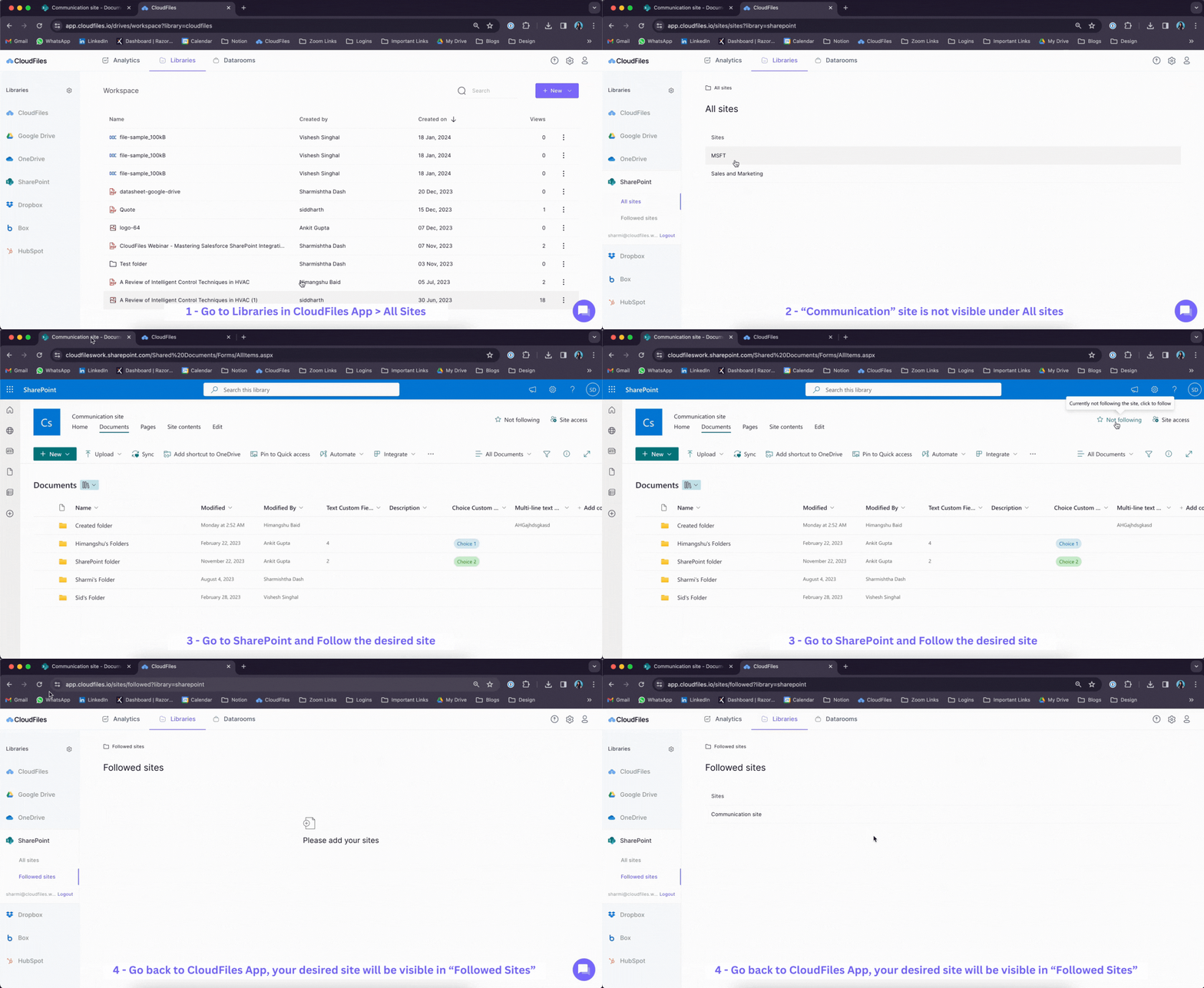
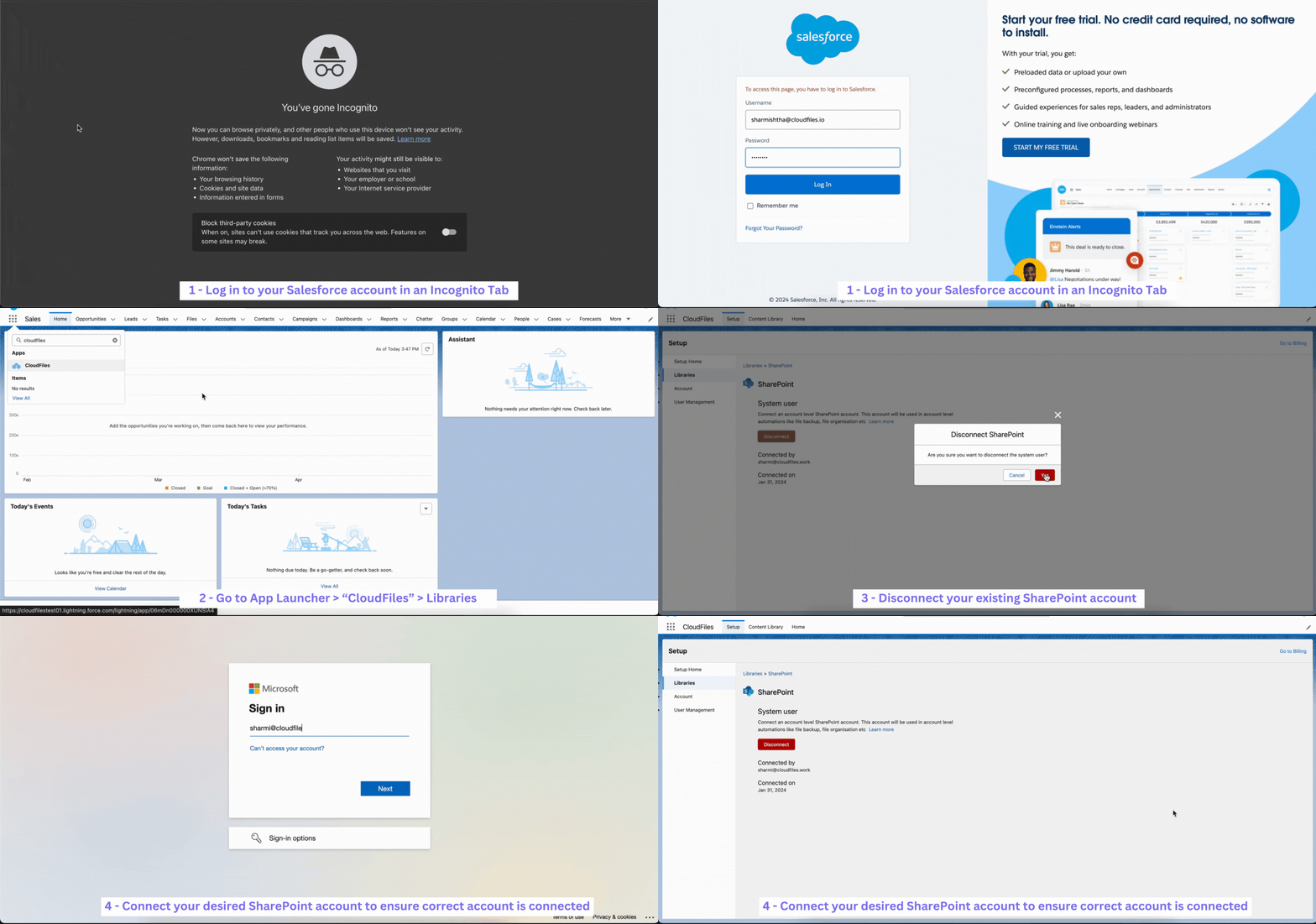
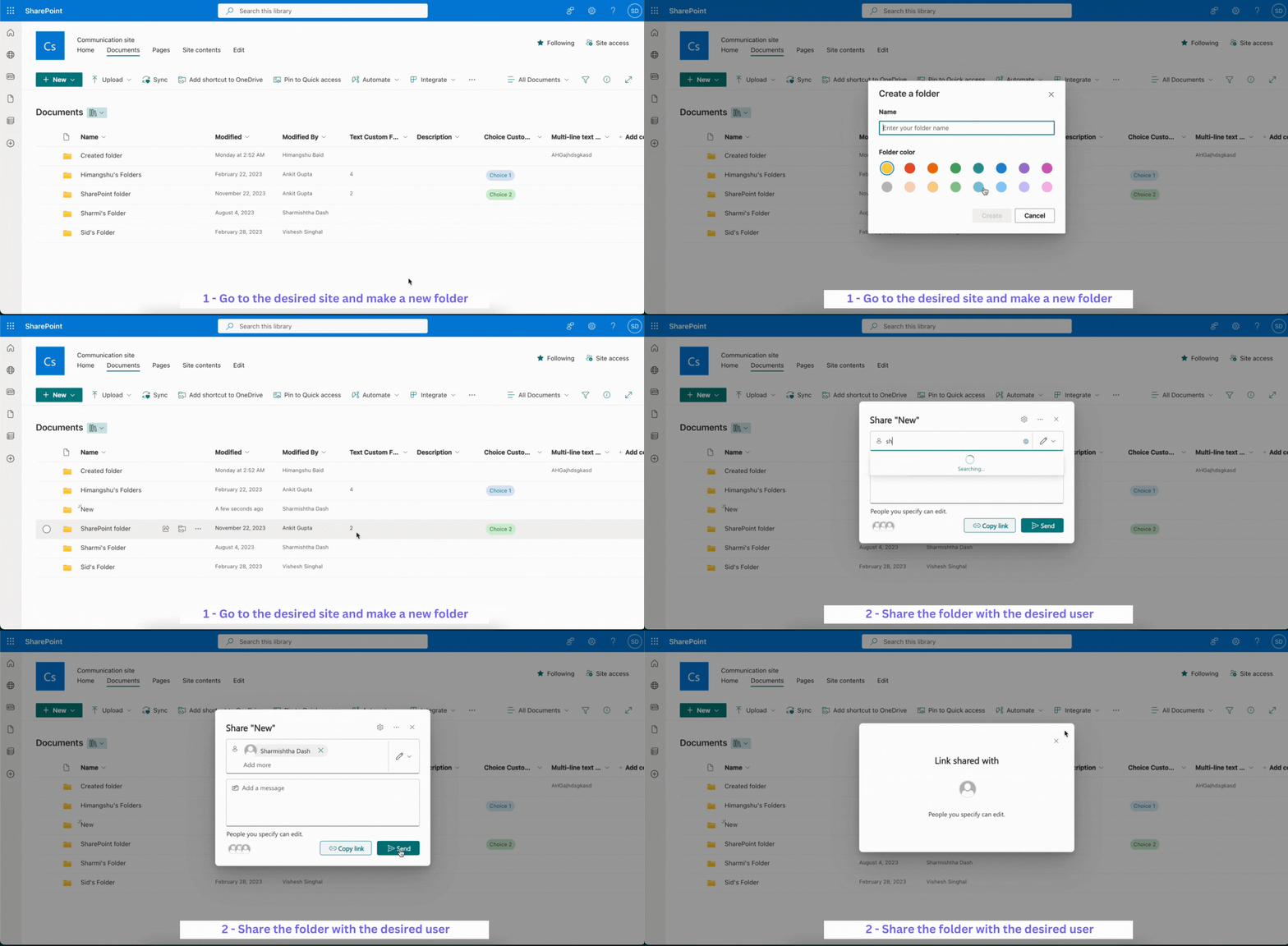
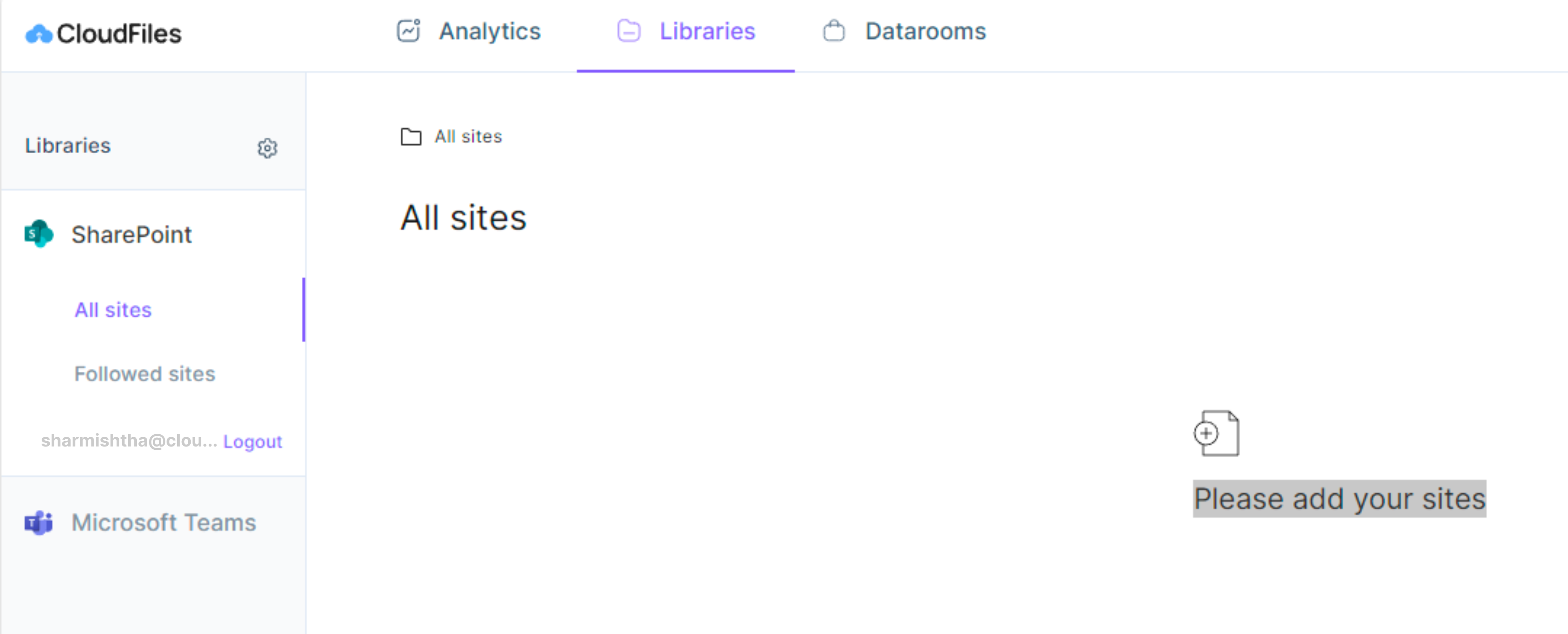
If you're unable to see any SharePoint sites in the Content Library tab of Salesforce, there might a few SharePoint configuration reasons to it. Follow the steps outlined in I cannot see any SharePoint Sites in the Content Library article to resolve this issue.


Previous
I am unable to reconnect the Integration User
Next
SharePoint Permissions