Introduction
The Create Dataset action in CloudFiles Document AI enables you to group multiple files into a single logical dataset and process them together using AI. A dataset represents a collection of files that can be versioned, queried, and compared as a whole. This makes it ideal for use cases where insights need to be drawn across multiple documents rather than from a single file.
Just like individual documents must be processed before they can be queried, datasets must first be created and processed so that their contents become searchable and queryable through CloudFiles AI.
This action is a foundational step for workflows that involve querying across multiple files, comparing data between documents, or asking high-level questions that span an entire dataset using Query Document/Dataset or Query Document/Dataset (Batch) actions.
What this action does
This action runs asynchronously, meaning it does not provide immediate output. The Create Dataset action processes multiple files together as a single dataset, preparing them for intelligent, cross-document querying within CloudFiles Document AI. Instead of returning output directly, it publishes a Dataset Created event once all dataset resources have been successfully processed. During processing, each file in the dataset is analyzed individually. The Dataset Created event includes the datasetId (a unique CloudFiles identifier), which is essential for querying the dataset in subsequent CloudFiles Document AI actions.
Example scenario
Consider a scenario where you need to analyze multiple KYC documents associated with an Account or Contact in Salesforce such as passports, national identity cards, address proofs, and utility bills. Instead of processing each file individually, you may want to treat all these documents as a single logical unit and ask questions like:
- “Do all documents belong to the same person?”
- “Compare the address across all submitted documents.”
- “Is there any mismatch in nationality or date of birth?”
To enable this process, you would:
- Create a flow that collects multiple related files (for example, all KYC documents attached to a Contact or uploaded via a CloudFiles widget) and uses the Create Dataset action to group and process them together.
- Set up another flow triggered by the dataset-created event, which references the datasetId and contextual information (such as the originating Salesforce record). This flow can then use Query Document/Dataset or Query Document/Dataset (Batch) actions to ask questions, compare values across files, or extract consolidated insights from the dataset.
Input Parameters
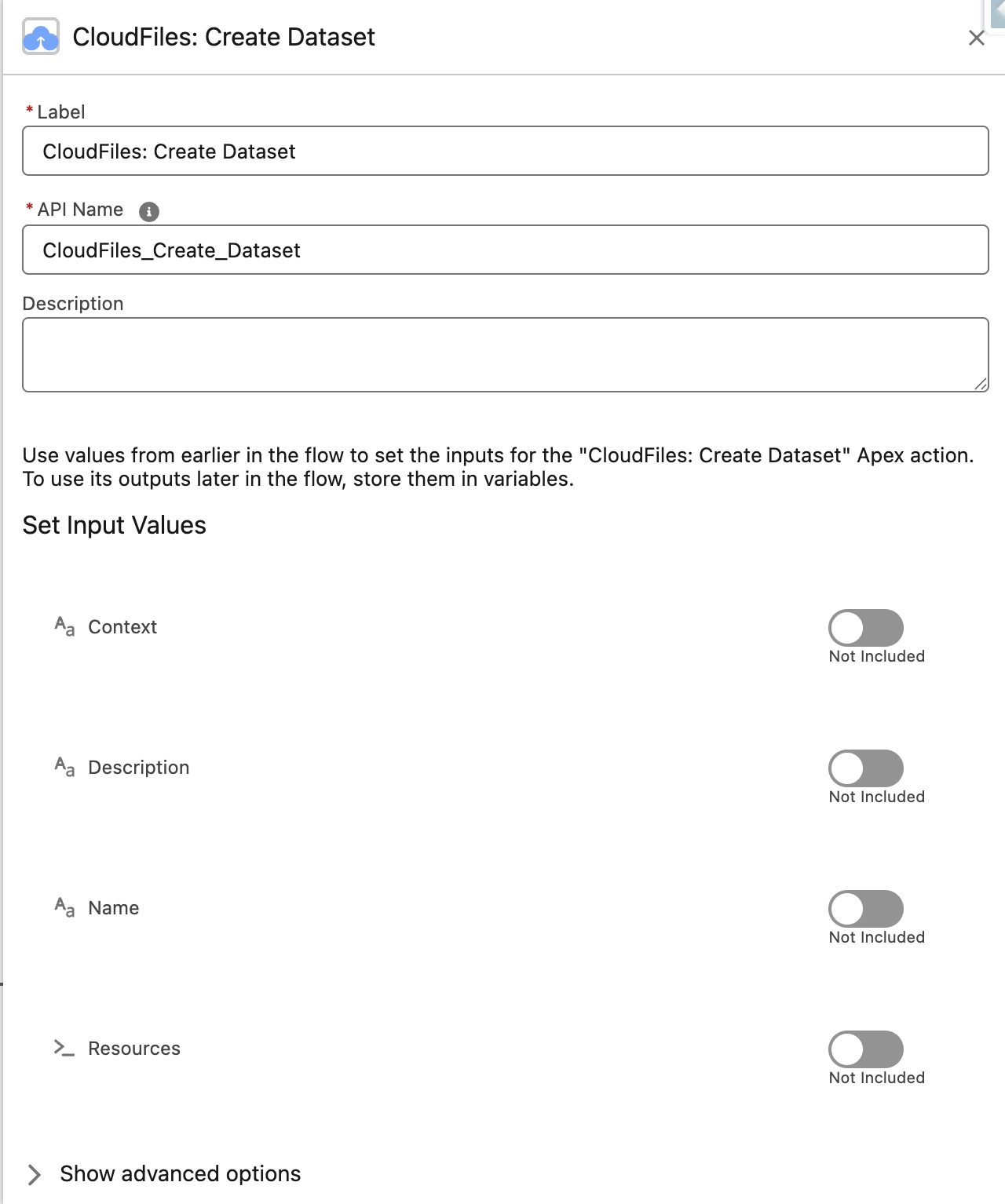
In Flow Builder, search for CloudFiles: Create Dataset under the CloudFiles category and configure the following inputs.
Context
An optional identifier to track the source of the event or any other intended/necessary details. This shall be available in corresponding output i.e. in the corresponding Dataset Created event details.
The Context parameter helps identify the origin of a dataset when the Create Dataset action is used across multiple flows. For example, when creating a dataset from documents attached to a Contact or Account, you can pass the record’s Id as the Context. This value is included in the Dataset Created event, allowing downstream flows to easily associate the dataset with the correct Salesforce record or process.
Name (Required)
A human-readable name for the dataset. This helps identify the dataset in queries, events, and version history.
Dataset Id (Optional)
If you want your new dataset to include files from an existing dataset, provide that dataset's Id here. The action will copy all resources from the referenced dataset into the newly created one, in addition to whatever files you specify in the Resources input.
This is useful when you want to build on a previous dataset — for example, a Contact submits additional KYC documents and you want to create a fresh dataset that includes both the previously submitted files and the new ones. Note that this always creates a new dataset; it does not modify or append to the existing one.
Resources (Required)
The Resources input specifies the files that will be included in the dataset. This parameter must be an Apex-defined collection of Resource objects. Only values provided in this collection are accepted by the Create Dataset action.
This is where you specify which files to include in the dataset. The parameter accepts an Apex-defined collection of Resource cldfs__Resourceobjects. Each Resource represents a single file source.
You can include files from Salesforce Files or external storage (via CloudFiles Document Management), NOT a mix of both.
Option A: Adding Salesforce Files
For each Salesforce file you want to include, set these properties on a cldfs__Resource variable:
- Library - salesforce(please note the parameters are case sensitive)
- FileID - The ContentDocumentID of the Salesforce File to be processed.
Option B: Adding External Storage Files
If you use the CloudFiles: Document Management package, you can also include files from connected external storage. Set these properties:
- Library - The Library parameter is the external storage type you are using. Possible values are sharepoint, google (for Google Drive), onedrive, dropbox, box, azure , cloudfiles (for AWS S3). Please note the parameters are case sensitive.
- Drive ID - The Id of the drive where the document resides. This is important for Google Drive & SharePoint libraries only. The Drive Id is a unique identifier for a storage location in both SharePoint and Google Drive. In SharePoint, it represents a document library within a site, while in Google Drive, it identifies a user's drive or shared drive.
- FileID - The unique identifier (Resource Id) of the file that is to be processed.
Example: Building the Resources Collection in Flow Builder
Scenario A: Looping Through Salesforce Files Attached to a Record
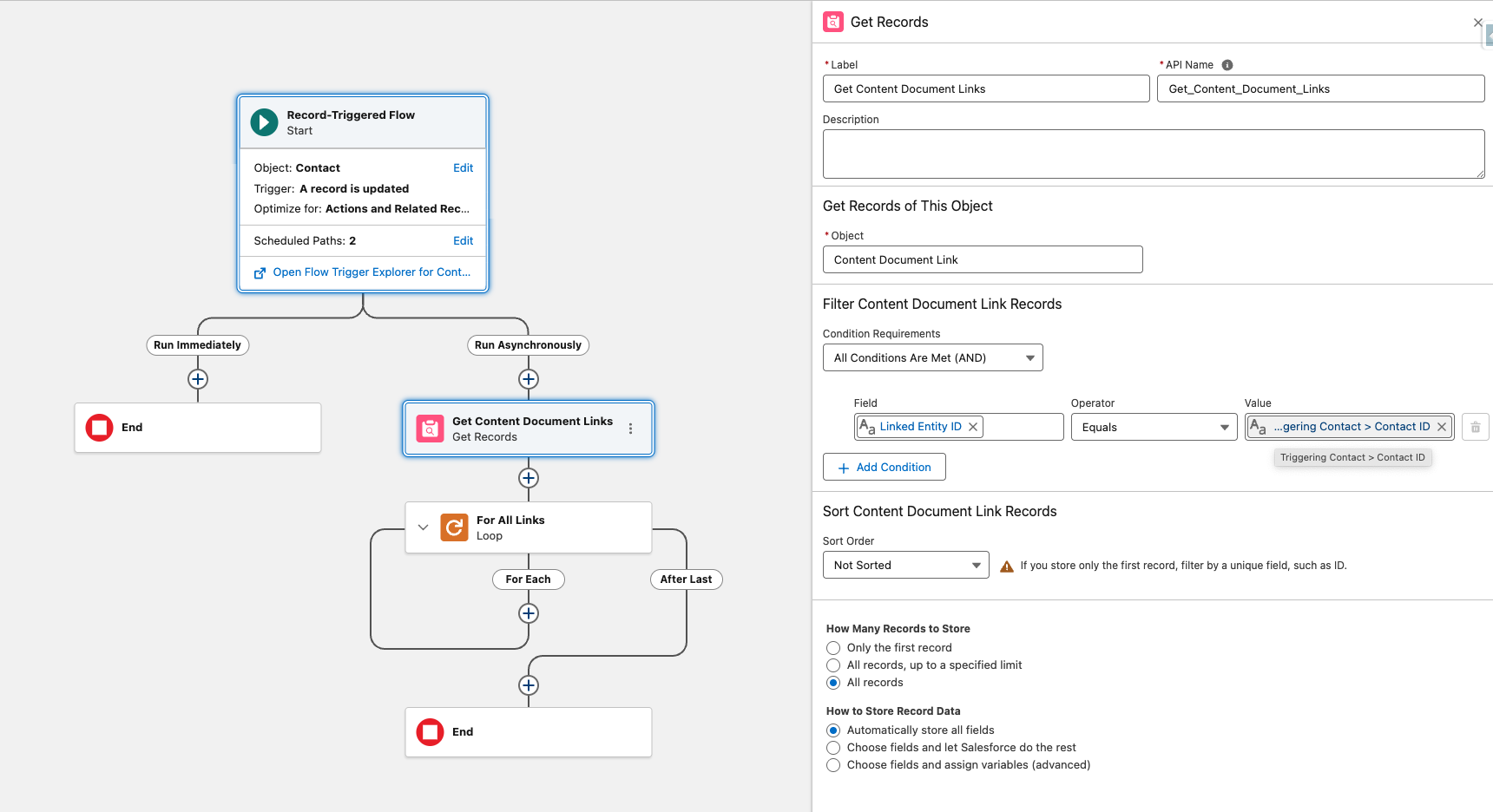
Use this approach when the files you want to include are Salesforce Files linked to a record (e.g., all files attached to a Contact or Account via ContentDocumentLink).
Step 1 — Retrieve the files. Add a Get Records element to query ContentDocumentLink where LinkedEntityId equals the Id of your source record (e.g., a ContactId ). Store the results in a collection variable — this gives you all the files attached to that record.
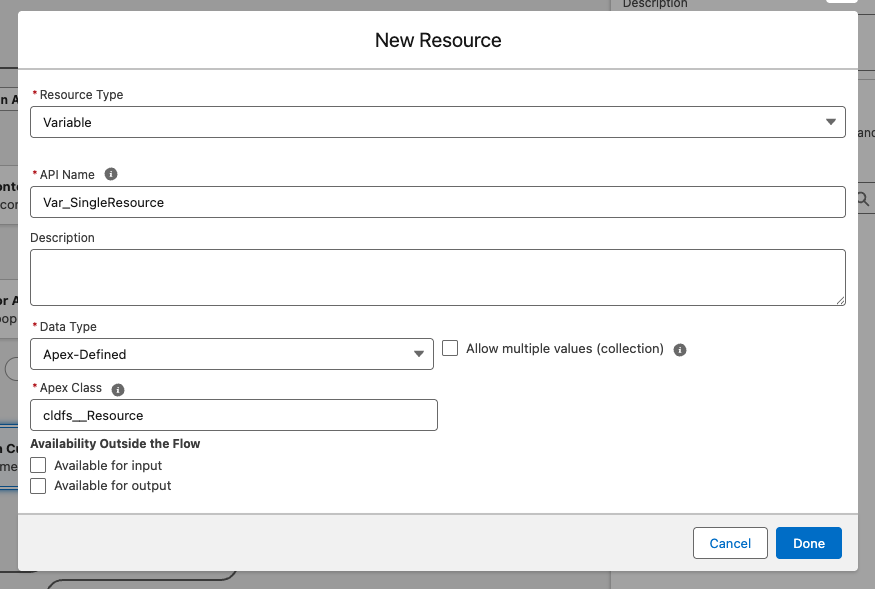
Step 2 — Create your working variables. You need two new variables:
- A single variable of type cldfs__Resource — call it something like Var_SingleResource. This will be reused on every pass through the loop.
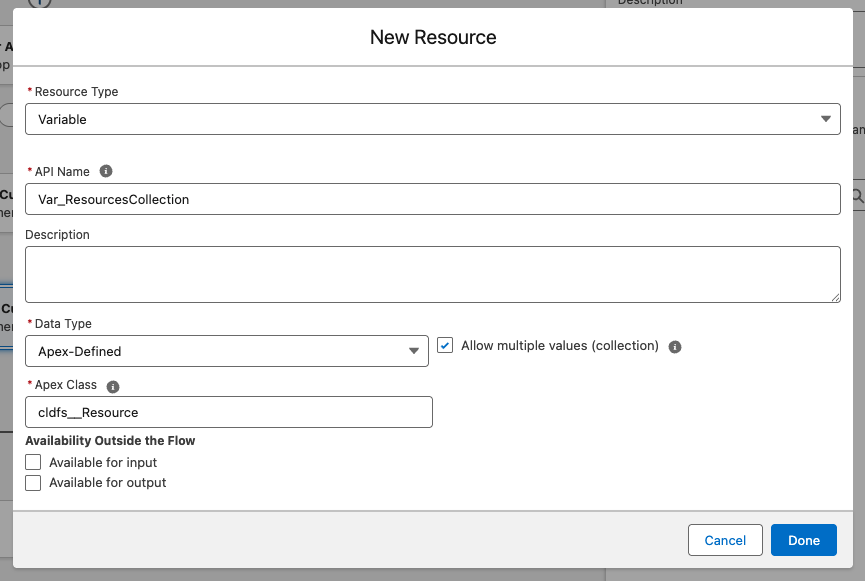
- A collection variable of type cldfs__Resource — call it something like Var_ResourcesCollection. This is what you'll ultimately pass to the Create Dataset action.
Step 3 — Add a Loop element. Drag in a Loop element and configure it to iterate over the ContentDocumentLink collection from Step 1. On each iteration, Flow automatically gives you access to the current ContentDocumentLinkrecord's fields.
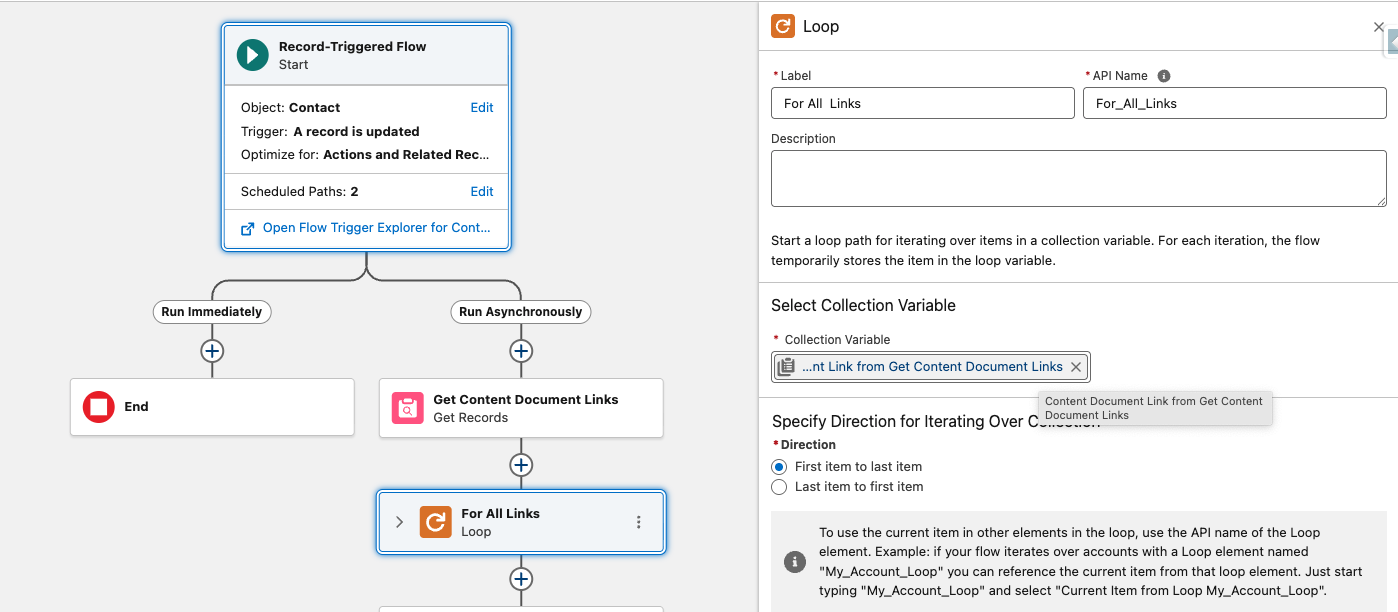
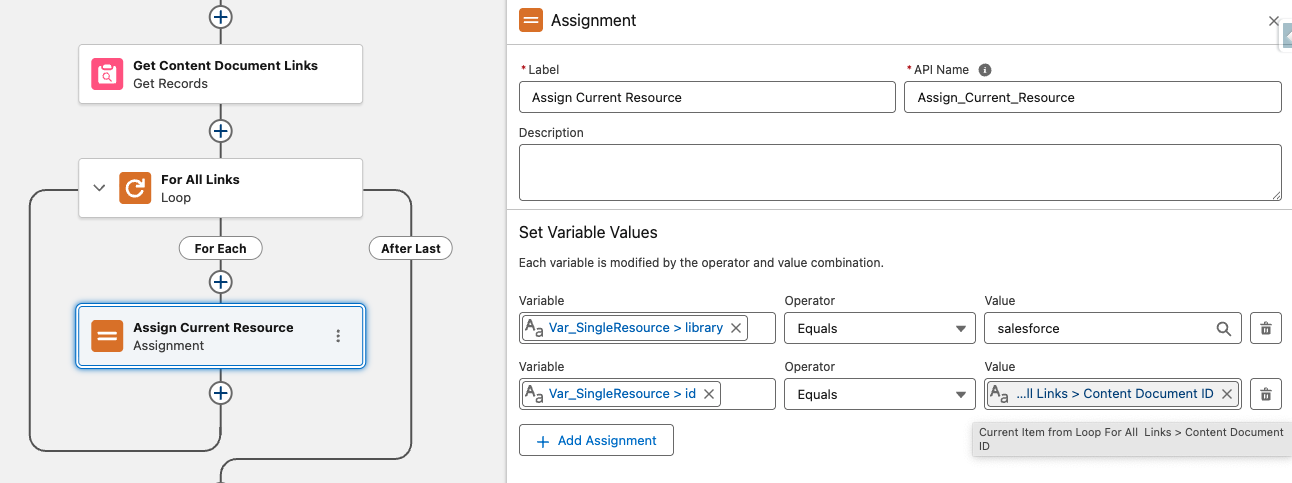
Step 4 — Assign values inside the loop. Inside the loop, add an Assignment element that sets the following on your SingleResource variable:
- library → salesforce
- id → the ContentDocumentId from the current loop iteration
Step 5 — Add the resource to the collection. Still inside the loop, add another Assignment element (or add to the same one) that adds SingleResource to ResourcesCollection.
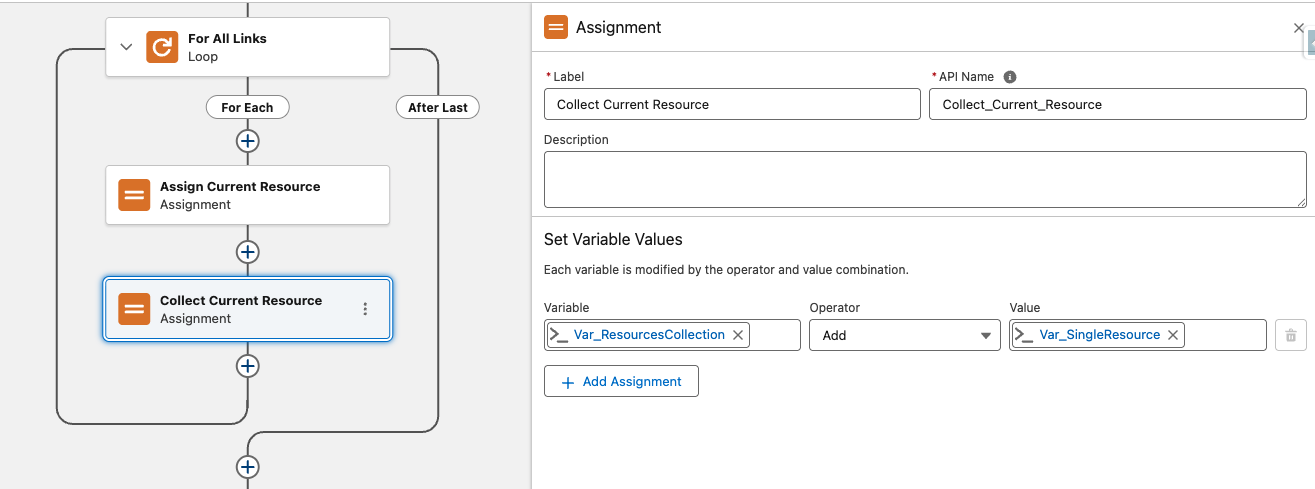
The loop repeats Steps 4–5 for every file attached to the record. By the time it finishes, ResourcesCollection contains a cldfs__Resource entry for each file — regardless of whether there were 2 files or 20.
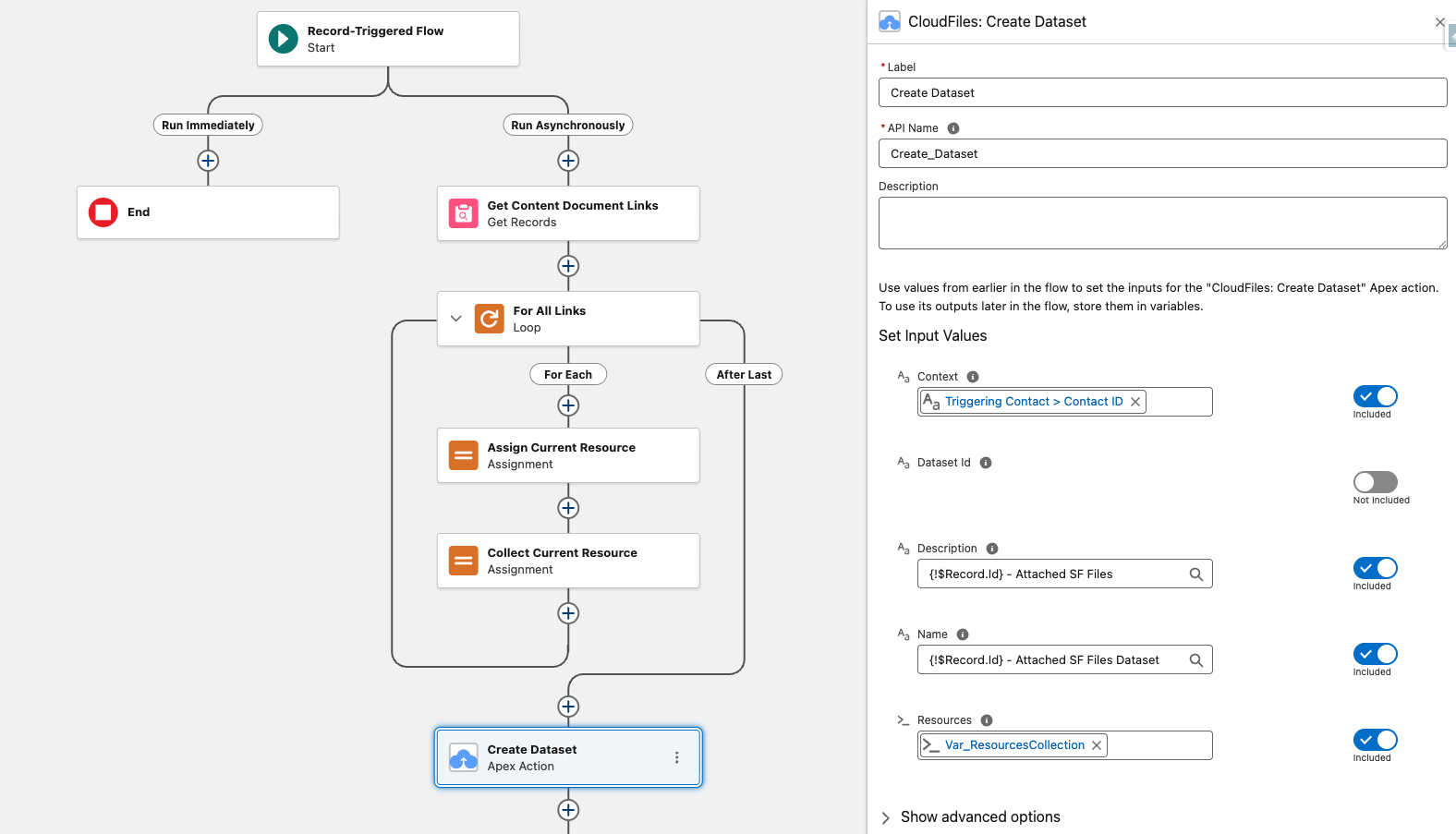
Step 6 — Pass the collection to the Create Dataset action. After the loop, connect the CloudFiles: Create Dataset action and map ResourcesCollection to its Resources input. The action now receives the complete, dynamically built list of files.
Scenario B: Passing External Storage Files
Use this approach when your files live in an external storage service connected through the CloudFiles: Document Management package (e.g., SharePoint, Google Drive, Dropbox, Box, OneDrive, Azure, or AWS S3).
Use an action like Get Folder Contents to fetch the files from your target folder in the connected storage. This action outputs an Apex-defined collection of Resource cldfs__Resource, you can pass it directly to the Create Dataset action.
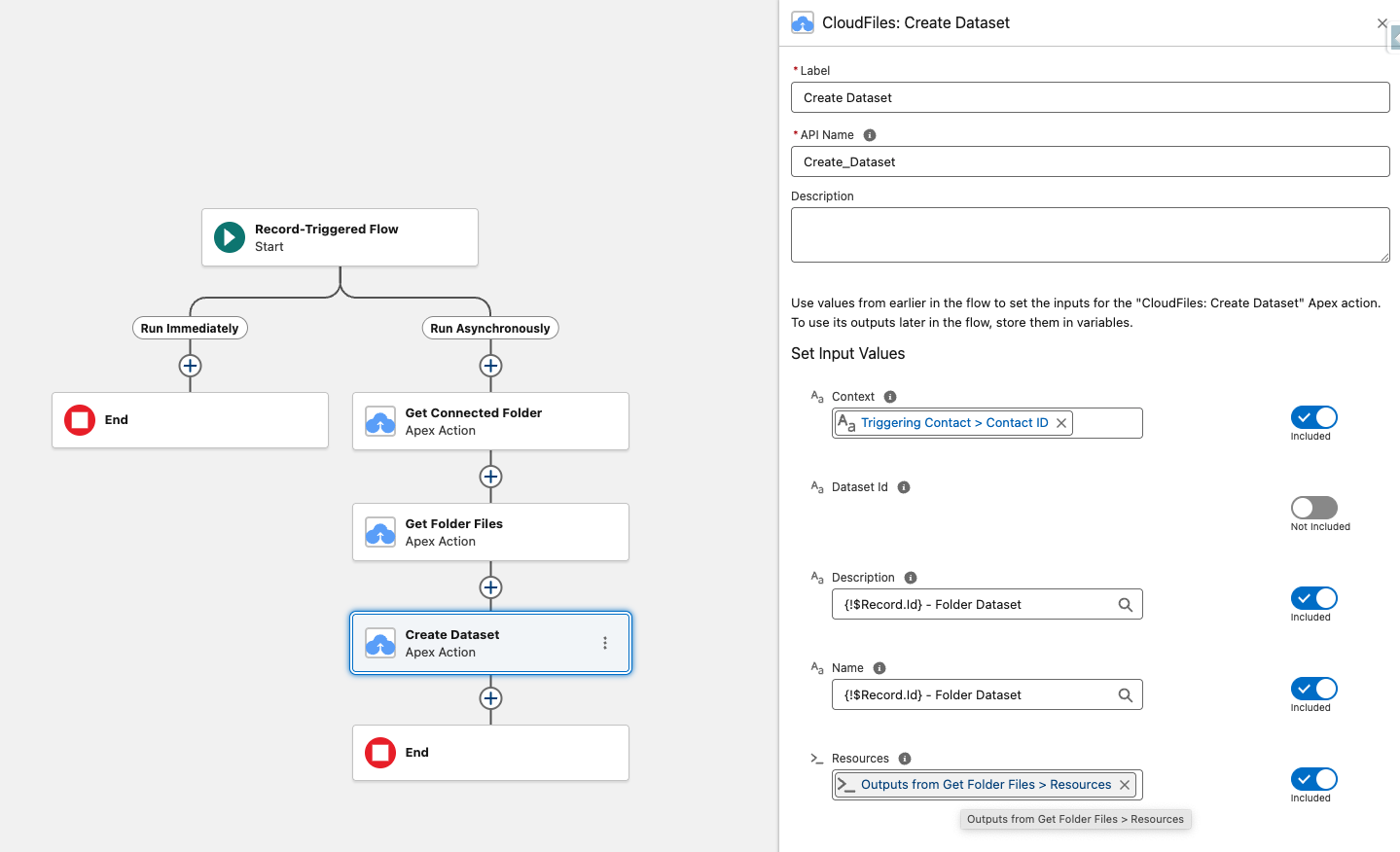
Note: The Get Folder Contents action returns all resources within a folder — both files and sub-folders. The Create Dataset action only accepts files, so passing folder resources will cause errors. Only add resources that are files by filtering such collections
Description (Optional)
An optional description to provide context about the dataset’s purpose or contents.
Output Parameters
The apex action does not return anything as an output in the flow it is used but for every dataset processed a Dataset Created event is published. This event signals the completion of file processing and can be used to trigger platform event flows to perform actions such as Query Document/Dataset or Query Document/Dataset (Batch).
If the action fails due to some reason, an error-event event will be triggered and this event can be used in a decision element to diagnose and handle the error.